Category: Generative AI

  • AI Loses Its First Matchup – Fantasy Football Agentic AI

    Straight to the point. AI lost is week one matchup by 2.28 points. I watched as many of the games as I could so that I could give a slight bit of commentary.

    First a re-cap. If you haven’t been following along, I have built and am continuing to improve upon an Agentic AI solution for drafting and managing a Fantasy Football team for the 2025 season. The team is entirely AI selected and you can see its predictions for week 1 here.

    There was a couple of concerns that I had looking at the lineup. Most notably Sam Darnold in the superflex (OP) position as I thought some of the other players might have break out games and boy was I right!

    Here is the results from week 1
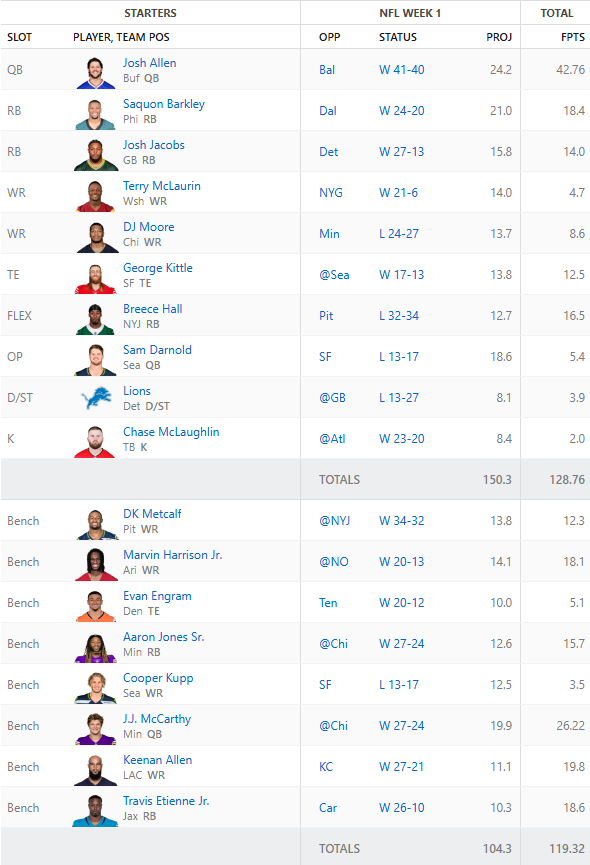
    Now, let’s comment on a few things. George Kittle left his game with an injury and is likely to miss a few weeks. AI can’t predict in game injuries, yet. DJ Moore was the final hope Monday night and he was either not targeted when he was open or Caleb Williams simply didn’t throw a good ball. AI, can’t predict in game performance, yet.

    Now, the Agent did hit on Josh Allen with his amazing performance against the Ravens. Breece Hall was also a great pick beating his projections.

    What’s Next?

    So we have some clear things to work out.

    1. Injuries – the AI Coach needs to understand that Kittle is likely out for a few weeks.
    2. Waivers – Now that we have an injury we need to replace a player. Engram is on the bench but is he the best tight end?

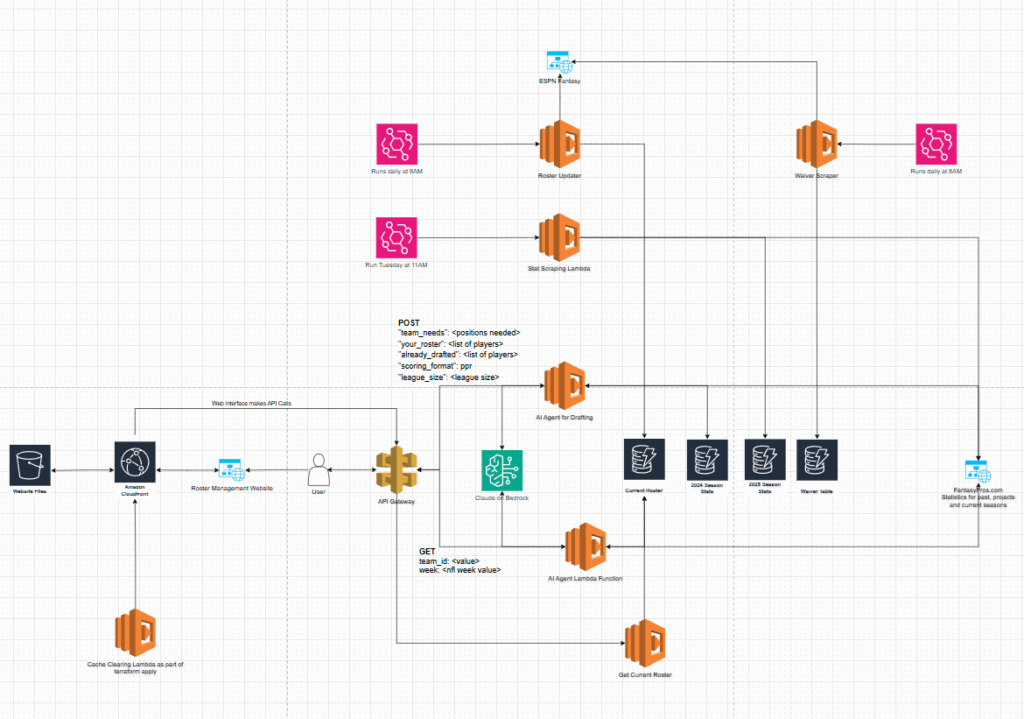
    With these clear needs in mind I am actively working on building out a waiver wire monitoring tool to grab available players from the ESPN Fantasy platform. Because ESPN doesn’t have a native API this has been particularly challenging. I added in a Lambda function that will run daily and update the other teams rosters in a DynamoDB table so that we could potentially compare lists of players from other sources. This would give us a subset of “available” players. I also will be adding in an injury parameter that will help assist the Agent in determining the next lineup. Finally, I am scraping out the fantasy points earned per team and storing them as another data set that the Agent can use to help make predictions.

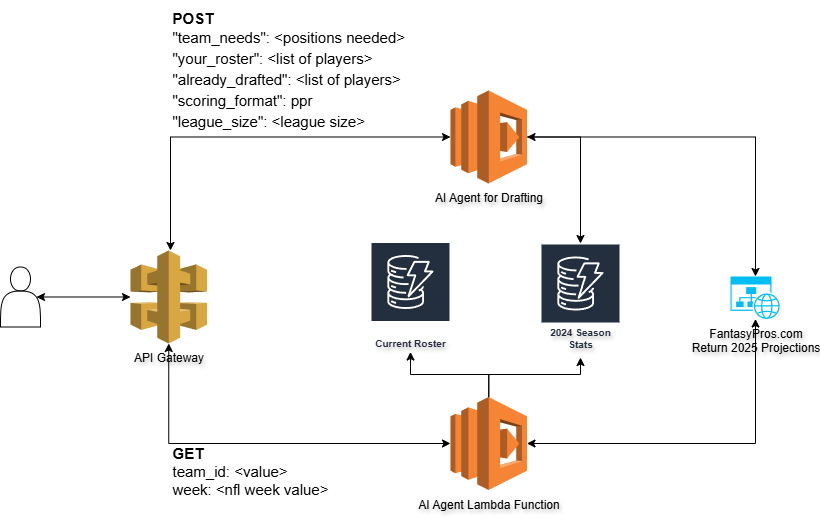
    Current architecture diagram:
    I’m also looking heavily into how I can structure all the data more efficiently so there is less infrastructure to manage. Ideally, it would be nice to have a single table with the player as the primary key and all of the subsets of data underneath.

    I think the AI is close to dominating the rest of the league! I will be posting its predictions for next week sometime on Thursday before the game!
  • Fantasy Football and AI Week 1

    Fantasy Football and AI Week 1

    The last you heard from me I was building a drafting agent for Fantasy Football. Well, the draft has finished and my roster is set. Behold, the Fantasy Football AI drafted team for my 8 team, PPR league.

    STARTING LINEUP
    QB – Josh Allen (BUF)
    RB – Saquon Barkley (PHI)
    RB – Josh Jacobs (GB)
    WR – Terry McLaurin (WSH)
    WR – DJ Moore (CHI)
    TE – George Kittle (SF)
    FLEX – Breece Hall (NYJ)
    OP – Sam Darnold (SEA)
    D/ST – Lions (DET)
    K – Chase McLaughlin (TB)
    BENCH
    WR – DK Metcalf (PIT)
    WR – Marvin Harrison Jr. (ARI)
    TE – Evan Engram (DEN)
    RB – Aaron Jones Sr. (MIN)
    WR – Cooper Kupp (SEA)
    QB – J.J. McCarthy (MIN)
    WR – Keenan Allen (LAC)
    RB – Travis Etienne Jr. (JAX)

    Now, I have also added another feature to the overall solution which is to include a week to week manager I’m calling the “coach”. I built a database that contains the 2024 statistics for each player and who they played against. I’m also scraping FantasyPros.com as well for future projections still.

    I added a new Lambda function and API call to my architecture so that I can send a request to the AI Agent to build out my ideal weekly roster.

    The roster I posted above is what I will be starting for week 1. The agent also provides some context as to why it selected each player.

    🏈 Fantasy Lineup for Team 1, Week 1
    ==================================================
    
    🏆 STARTING LINEUP:
        QB: Josh Allen             (BUF) 23.4 pts
        RB: Saquon Barkley         (PHI) 19.9 pts
        RB: Josh Jacobs            (GB)  15.5 pts
        WR: Terry McLaurin         (WAS) 11.1 pts
        WR: DJ Moore               (CHI) 12.5 pts
        TE: George Kittle          (SF)  10.6 pts
      FLEX: Breece Hall            (NYJ) 11.5 pts
        OP: Sam Darnold            (SEA) 18.6 pts
         K: Chase McLaughlin       (TB)   8.5 pts
       DST: Lions                  (DET)  9.2 pts
    
      💯 TOTAL PROJECTED: 145.4 points
    
    📋 BENCH (Top 5):
        WR: Keenan Allen            7.6 pts
        WR: DK Metcalf              8.6 pts
        WR: Marvin Harrison Jr.     9.5 pts
        WR: Cooper Kupp             9.0 pts
        RB: Aaron Jones Sr.        12.8 pts
    
    💡 COACH ANALYSIS:
    ==================================================
    Made one key adjustment to the computed lineup: replaced
      Keenan Allen with DJ Moore at WR2. While Allen showed
      decent recent form (9.325 avg last 4 games), DJ Moore is
      the higher-drafted talent with WR1 upside who should be
      prioritized in Week 1. Moore's lack of 2024 data likely
      indicates injury, but his talent level and role in
      Chicago's offense make him the better play. The rest of
      the lineup is solid: Allen/Darnold QB combo maximizes
      ceiling, Barkley/Jacobs/Hall provide strong RB production,
      McLaurin offers consistency at WR1, and Kittle remains a
      reliable TE1. Lions DST should perform well at home, and
      McLaughlin provides steady kicking in Tampa Bay's offense.
    
    ==================================================

    There are still some gaps I need to fill with the data set as D.J. Moore did play in 2024 so I’m likely missing some data sets. I also have plans to build a “general manager” who can scan available players and find maybe some hidden gems on a week to week basis.

    Finally, command line tools are fun but, I think the solution needs a web interface so watch for updates on that. The coach will inevitably automated and send me a report on the weeks performance as well as suggestions for the following week.

    If you like Fantasy Football and technology follow along to see how this team performs throughout the season!

    All the code is available here on GitHub: https://github.com/avansledright/fantasy-football-agent

  • An AI Fantasy Football Draft Assistant

    Last year I attempted to program a Fantasy Football draft assistant which took live data from ESPN’s Fantasy Platform. Boy was that a mistake…

    First of all, shame on ESPN for not having an API for their Fantasy sports applications. The reverse engineered methods were not fast enough nor were they reliable. So, this year I took a new approach to building out a system for getting draft pick recommendations for my team.

    I also wanted to put to use the example architecture and code I wrote the other day for the Strands SDK to work so I utilized it to build an API which would utilize the AWS Bedrock platform to analyze data and and ultimately return the best possible picks.

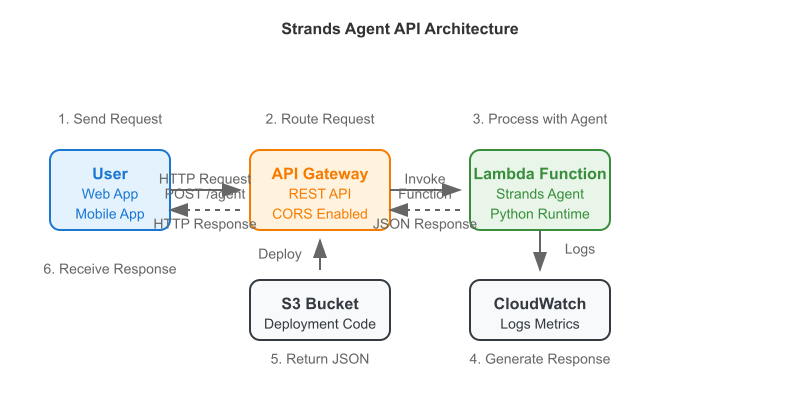
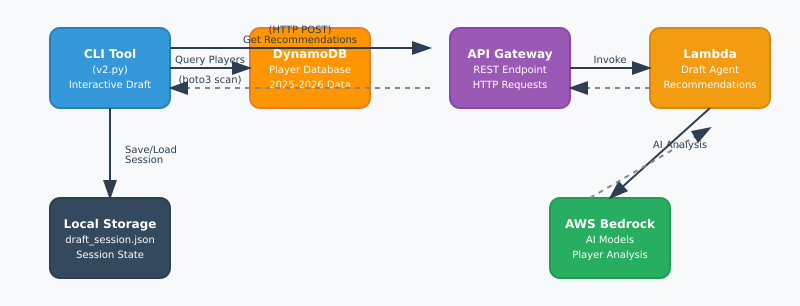
    Here is a simple workflow of how the tool works:

    I generated this with Claude AI. It is pretty OK.

    The first problem I encountered was getting data. I needed two things:
    1. Historical data for players
    2. Projected fantasy data for the upcoming season

    The historical data provides information about the players past season and the projections are for the upcoming season, obviously. The projections are useful because of any incoming rookies.

    In the repository I link below I put a scripts to scrape FantasyPros for both the historical and projected data. It stores them in separate files in case you want to utilize them in a different way. There is also a script to combine them into one data source and ultimately load them into a DynamoDB table.

    The most important piece of the puzzle was actually simulating the draft. I needed to create a program that would be able to track the other team’s draft picks as well as give me the suggestions and track my teams picks. This is the heart of the repository and I will be using it to get suggestions and track the draft for this coming season.

    Through the application, when you issue the “next” command the application will send a request to the API with the current situation of the draft. The payload looks like this:

    payload = {
                "team_needs": team_needs,
                "your_roster": your_roster,
                "already_drafted": all_drafted_players,
                "scoring_format": self.session.scoring_format if self.session else "ppr",
                "league_size": self.session.league_size if self.session else 12
            }

    The “team_needs” key represents the current number of players remaining for each position. The “your_roster” position is all of the current players on my team. The other important key is “already_drafted”. This key sends all of the drafted players to the AI agent so it knows who NOT to recommend.

    The application goes through all of the picks and you are able to manually enter each of the other teams picks until the draft is complete.

    I’ll post an update after my draft on August 24th with the team I end up with! I still will probably lose in my league but this was fun to build. I hope to add in some sort of week-to-week management of my team as well as a trade analysis tool in the future. It would also be cool to add in some sort of analysis that could send updates to my Slack or Discord.

    If you have other ideas message me on any platform you can find me on!

    GitHub: https://github.com/avansledright/fantasy-football-agent

  • Deploying a Strands Agent on AWS Lambda using Terraform

    Recently I’ve been exploring the AI space a lot more as I’m sure a lot of you are doing as well. I’ve been looking at the Strands Agent SDK. I see this SDK as being very helpful in building out agents in the future (follow the blog to see what I come up with!).

    One thing that is not included in the SDK is the ability to deploy with Terraform. The SDK includes examples of how to package and deploy with Amazon Web Services CDK so I adapted that to utilize Terraform.

    I took my adaptation a step further and added an API Gateway layer so that you have the beginnings of a very simple AI agent deployed with the Strands SDK.

    Check out the code here: https://github.com/avansledright/terraform-strands-agent-api

    The code in the repository is fairly simple and includes everything you need to build an API Gateway, Lambda function, and some other useful resources just to help out.

    The key to all of this is packaging the required dependencies inside of the Lambda Layer. Without this the function will not work.

    File structure:
    terraform-strands-agent-api/
    └── lambda_code/
    │ ├── lambda_function.py # Your Strands agent logic
    │ └── requirements.txt # strands-agents + dependencies
    ├── api_gateway.tf # API Gateway configuration
    ├── iam.tf # IAM roles and policies
    ├── lambda.tf # Lambda function setup
    ├── locals.tf # Environment variables
    ├── logs.tf # CloudWatch logging
    ├── s3.tf # Deployment artifacts
    ├── variables.tf # Configurable inputs
    └── outputs.tf # API endpoints and resource IDs

    You shouldn’t have to change much in any of these files until you want to fully start customizing the actual functionality of the agent.

    To get started follow the instructions below!

    git clone https://github.com/avansledright/terraform-strands-agent-api
    cd terraform-strands-agent-api
    
    # Configure your settings. Add other values as needed
    echo 'aws_region = "us-west-2"' > terraform.tfvars
    
    # Deploy everything
    terraform init
    terraform plan
    terraform apply

    If everything goes as planned you should see the output of a curl command which will give you the ability to test the demo code.

    If you run into any issues feel free to let me know! I’d be happy to help you get this up and running.

    Github

    If this has helped you in any way, please share it on your social media and with any of your friends!

  • Create an Image Labeling Application using Artificial Intelligence

    I have a PowerPoint party to go to soon. Yes you read that right. At this party everyone is required to present a short presentation about any topic they want. Last year I made a really cute presentation about a day in the life of my dog.

    This year I have decided that I want to bore everyone to death and talk about technology, Python, Terraform and Artificial Intelligence. Specifically, I built an application that allows a user to upload an image and have it return to them a renamed file that is labeled based on the object or scene in the image.

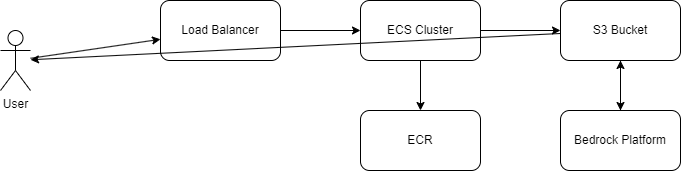
    The architecture is fairly simple. We have a user connecting to a load balancer which routes traffic to our containers. The containers connect Bedrock and S3 for image.

    If you want to try it out the site is hosted at https://image-labeler.vansledright.com It will be up for some time, I haven’t decided how long I will host it for but at least through this weekend!

    Here is the code that interacts with Bedrock and S3 to process the image:

    def process_image():
        if not request.is_json:
            return jsonify({'error': 'Content-Type must be application/json'}), 400
    
        data = request.json
        file_key = data.get('fileKey')
    
        if not file_key:
            return jsonify({'error': 'fileKey is required'}), 400
    
        try:
            # Get the image from S3
            response = s3.get_object(Bucket=app.config['S3_BUCKET_NAME'], Key=file_key)
            image_data = response['Body'].read()
    
            # Check if image is larger than 5MB
            if len(image_data) > 5 * 1024 * 1024:
                logger.info("File size to large. Compressing image")
                image_data = compress_image(image_data)
    
            # Convert image to base64
            base64_image = base64.b64encode(image_data).decode('utf-8')


            # Prepare prompt for Claude
            prompt = """Please analyze the image and identify the main object or subject. 
            Respond with just the object name in lowercase, hyphenated format. For example: 'coca-cola-can' or 'golden-retriever'."""
            
            # Call Bedrock with Claude
            response = bedrock.invoke_model(
                modelId='anthropic.claude-3-sonnet-20240229-v1:0',
                body=json.dumps({
                    "anthropic_version": "bedrock-2023-05-31",
                    "max_tokens": 100,
                    "messages": [
                        {
                            "role": "user",
                            "content": [
                                {
                                    "type": "text",
                                    "text": prompt
                                },
                                {
                                    "type": "image",
                                    "source": {
                                        "type": "base64",
                                        "media_type": response['ContentType'],
                                        "data": base64_image
                                    }
                                }
                            ]
                        }
                    ]
                })
            )
            
            response_body = json.loads(response['body'].read())
            object_name = response_body['content'][0]['text'].strip()
            logging.info(f"Object found is: {object_name}")
            
            if not object_name:
                return jsonify({'error': 'Could not identify object in image'}), 422
    
            # Get file extension and create new filename
            _, ext = os.path.splitext(unquote(file_key))
            new_file_name = f"{object_name}{ext}"
            new_file_key = f'processed/{new_file_name}'
            
            # Copy object to new location
            s3.copy_object(
                Bucket=app.config['S3_BUCKET_NAME'],
                CopySource={'Bucket': app.config['S3_BUCKET_NAME'], 'Key': file_key},
                Key=new_file_key
            )
            
            # Generate download URL
            download_url = s3.generate_presigned_url(
                'get_object',
                Params={
                    'Bucket': app.config['S3_BUCKET_NAME'],
                    'Key': new_file_key
                },
                ExpiresIn=3600
            )
            
            return jsonify({
                'downloadUrl': download_url,
                'newFileName': new_file_name
            })
            
        except json.JSONDecodeError as e:
            logger.error(f"Error decoding Bedrock response: {str(e)}")
            return jsonify({'error': 'Invalid response from AI service'}), 500
        except Exception as e:
            logger.error(f"Error processing image: {str(e)}")
            return jsonify({'error': 'Error processing image'}), 500

    If you think this project is interesting, feel free to share it with your friends or message me if you want all of the code!

  • Building a Python Script to Export WordPress Posts: A Step-by-Step Database to CSV Guide

    Today, I want to share a Python script I’ve been using to extract blog posts from WordPress databases. Whether you’re planning to migrate your content, create backups, or analyze your blog posts, this tool makes it straightforward to pull your content into a CSV file.

    I originally created this script when I needed to analyze my blog’s content patterns, but it’s proven useful for various other purposes. Let’s dive into how you can use it yourself.

    Prerequisites

    Before we start, you’ll need a few things set up on your system:

    • Python 3.x installed on your machine
    • Access to your WordPress database credentials
    • Basic familiarity with running Python scripts

    Setting Up Your Environment

    First, you’ll need to install the required Python packages. Open your terminal and run:

    pip install mysql-connector-python pandas python-dotenv

    Next, create a file named .env in your project directory. This will store your database credentials securely:

    DB_HOST=your_database_host
    DB_USERNAME=your_database_username
    DB_PASS=your_database_password
    DB_NAME=your_database_name
    DB_PREFIX=wp  # Usually 'wp' unless you changed it during installation

    The Script in Action

    The script is pretty straightforward – it connects to your WordPress database, fetches all published posts, and saves them to a CSV file. Here’s what happens under the hood:

    • Loads environment variables from your .env file
    • Establishes a secure connection to your WordPress database
    • Executes a SQL query to fetch all published posts
    • Converts the results to a pandas DataFrame
    • Saves everything to a CSV file named ‘wordpress_blog_posts.csv’

    Running the script is as simple as:

    python main.py

    Security Considerations

    A quick but important note about security: never commit your .env file to version control. I’ve made this mistake before, and trust me, you don’t want your database credentials floating around in your Git history. Add .env to your .gitignore file right away.

    Potential Use Cases

    I wrote this script to feed my posts to AI to help with SEO optimization and also help with writing content for my other businesses. Here are some other ways I’ve found this script useful:

    • Creating offline backups of blog content
    • Analyzing post patterns and content strategy
    • Preparing content for migration to other platforms
    • Generating content reports

    Room for Improvement

    The script is intentionally simple, but there’s plenty of room for enhancement. You might want to add:

    • Support for extracting post meta data
    • Category and tag information
    • Featured image URLs
    • Comment data

    Wrapping Up

    This tool has saved me countless hours of manual work, and I hope it can do the same for you. Feel free to grab the code from my GitHub repository and adapt it to your needs. If you run into any issues or have ideas for improvements, drop a comment below.

    Happy coding!

    Get the code on GitHub

  • Converting DrawIO Diagrams to Terraform

    I’m going to start this post of by saying that I need testers. People to test this process from an interface perspective as well as a data perspective. I’m limited on the amount of test data that I have to put through the process.

    With that said, I spent my Thanksgiving Holiday writing code, building this project and putting in way more time that I thought I would but boy is it cool.

    If you’re like me and working in a Cloud Engineering capacity then you probably have built a DrawIO diagram at some point in your life to describe or define your AWS architecture. Then you have spent countless hours using that diagram to write your Terraform. I’ve built something that will save you those hours and get you started on your cloud journey.

    Enter https://drawiototerraform.com. My new tool that allows you to convert your DrawIO AWS Architecture diagrams to Terraform just by uploading them. The process uses a combination of Python and LLM’s to identify the components in your diagram and their relationships, write the base Terraform, analyze the initial Terraform for syntax errors and ultimately test the Terraform by generating a Terraform plan.

    All this is then delivered to you as a ZIP file for you to review, modify and ultimately deploy to your environment. By no means is it perfect yet and that is why I am looking for people to test the platform.

    If you, or someone you know, is interested in helping me test have them reach out to me on through the website’s support page and I will get them some free credits so that they can test out the platform with their own diagrams.

    If you are interested in learning more about the project in any capacity do not hesitate to reach out to me at anytime.

    Website: https://drawiototerraform.com

  • Product Name Detection with AWS Bedrock & Anthropic Claude

    Well, my AWS bill me a bit larger than normal this month due to testing this script. I thoroughly enjoy utilizing Generative AI to do work for me and I had some spare time to tackle this problem this week.

    A client sent me a bunch of product images that were not named properly. All of the files were named something like “IMG_123.jpeg”. There was 63 total files so I decided rather than going through them one by one I would see if I could get one of Anthropic’s models to handle it for me and low and behold it was very successful!

    I scripted out the workflow in Python and utilized AWS Bedrock’s platform to execute the interactions with the Claude 3 Haiku model. Take a look at the code below to see how this was executed.

    if __name__ == "__main__":
        print("Processing images")
        files = os.listdir("photos")
        print(len(files))
        for file in files:
            if file.endswith(".jpeg"):
                print(f"Sending {file} to Bedrock")
                with open(f"photos/{file}", "rb") as photo:
    
                    prompt = f"""
                        Looking at the image included, find and return the name of the product. 
                        Rules: 
                        1. Return only the product name that has been determined.
                        2. Do not include any other text in your response like "the product determined..."
                        """
                    model_response = bedrock_actions.converse(
                        prompt, 
                        image_format="jpeg",
                        encoded_image=photo.read(),
                        max_tokens="2000",
                        temperature=.01,
                        top_p=0.999
                        )
                    print(model_response['output'])
                    product_name = modify_product_name(model_response['output']['message']['content'][0]['text'])
                    
                    photo.close()
                    if os.system(f"cp photos/{file} renamed_photos/{product_name}.jpeg") != 0:
                        print("failed to move file")
                    else:
                        os.system(f"mv photos/{file} finished/{file}")
        sys.exit(0)

    The code will loop through all the files in a folder called “photos” passing each one to Bedrock and getting a response. There was a lot of characters that were returned that would either break the script or that are just not needed so I also wrote a function to handle those.

    Ultimately, the script will copy the photo to a file named after the product and then move the original file into a folder called “finished”.

    I’ve uploaded the code to GitHub and you can utilize it however you want!