Tag: ai

  • The state of SEOScoreAPI – An OpenClaw Project

    The state of SEOScoreAPI – An OpenClaw Project

    If you remember, I did an experiment with OpenClaw. I let it have access to build anything it wanted with a single EC2 instance. It built https://seoscoreapi.com which is a fantastic tool for checking the status of your websites SEO.

    Initially I thought I would scrap the project and just let the domain expire. But I started doing some manual promotion after OpenClaw spent over $200 and got the first paid user! Since then I’ve put a few hours a day promoting and adding some features.

    What’s New

    The last few months have been the most productive stretch since launch. Here’s what shipped:

    ADA Accessibility Audits

    This one came from watching the news. ADA website lawsuits hit over 4,000 in 2025 and they’re still climbing. Small businesses, e-commerce sites, local restaurants — everyone’s a target.

    We built a full WCAG 2.1 AA compliance endpoint that injects axe-core (the industry-standard accessibility engine) into a headless browser and scans the rendered page. It returns a compliance score, a lawsuit risk assessment, category breakdowns across 10 areas (color contrast, forms, keyboard navigation, ARIA, etc.), and specific fix suggestions for every violation.

    We ran it on our own site first. Scored a 71. Found contrast issues, links that weren’t distinguishable from body text, a misused aside element. Fixed everything. Now we score 100. That’s the point — even developers who care about accessibility miss things.

    Available on all paid plans. Starter gets 5/month, Ultra gets 500.

    GEO (Generative Engine Optimization)

    Traditional SEO gets you into Google. GEO gets you into ChatGPT, Claude, Perplexity, and every RAG pipeline pulling from the web.

    The GEO audit checks 26 factors across four categories: crawl accessibility, structural markup, content extractability, and AI discoverability. It answers questions like: Do you have an llms.txt file? Is your content chunked in a way that RAG systems can ingest? Do you have freshness signals? Are AI crawlers even allowed in your robots.txt?

    This is becoming more relevant every month. Traffic from AI systems is growing and most sites aren’t optimized for it at all.

    Competitive Audits

    You can now audit your site against competitors in a single request. The response shows a side-by-side comparison with score differentials, category-by-category breakdowns, and which specific checks you’re winning or losing on. Useful for agencies pitching prospects and for anyone doing competitive analysis.

    What’s Next

    Honestly I’m not sure. I would love to get more people using the service. Possibly some more integrations, a WordPress plugin?

    Try It

    If you’ve read this far, go audit your site: seoscoreapi.com

    The demo on the homepage doesn’t require a signup. Type in your URL, see your score, read the priorities list. If you want API access, the free tier takes 30 seconds to set up — just an email and a verification code.

    If you’re a developer, the docs have everything. Python and Node.js SDKs are on PyPI and npm. The GitHub Action is at SeoScoreAPI/seo-audit-action.

    If you have questions or feedback, I’m at aaron@seoscoreapi.com.
  • Why I built my own WordPress Platform

    Why I built my own WordPress Platform

    I’ve been building websites for a long time. I remember learning HTML and Microsoft FrontPage as my first website builder. It was such a fun time to be creating horrific looking websites back in the early 2000s. As the internet progressed so did my skills and back in 2016 I formed my company 45Squared to build websites for small businesses. My whole goal is to be your trusted resource when it comes to being online.

    When I started the company I built WordPress websites of various shapes and sizes but they always ran on AWS. This helped me expand my AWS skills as well as provide robust infrastructure for my client’s websites to live on. I managed the website and the underlying infrastructure for a small monthly cost that beat the competition. The result, a bunch of paying customers a decent side hustle.

    As time went on, selling became harder and the race to zero for cost was apparent. So, as the AI boom is on, I decided that it was time to automate the site building process.

    I started documenting out how I would want this to work. Fully automated website deployments, design, content, custom domains, good SEO base and deployed FAST!

    Enter https://ai.45sq.net. This platform is fully automated. The customer can provide inputs and descriptions of what they want as well as photos or other graphical content. The workflow takes all of the inputs and builds a fully functional WordPress website hosted on AWS. The user can easily point their own domain to the server and setup automatic payments. They then get full administrative access to their website so they can expand and add features just like any other WordPress site.

    So why did I build this?

    If you contact a web designer now you will have to pay them to build up the initial design, work with their timelines, end up with something that needs revisions and your time to live will be in the weeks not minutes.

    The platform I built for 45Squared eliminates the need for the initial design fees and focuses on getting you online quickly. Its great for small businesses who are just getting started.

    So now when I get a request to build a site I can tell the customer that I have two options. First, fully custom. I’m still willing to sit with you and build out the picture perfect website. Or, two, you can launch your own and I will still support the website and help you with your online presence.

    So that’s it. An easy to use WordPress website launcher. Running on enterprise grade cloud. With content, design, layout and all the rest handled by the magic of Claude Opus.

    Try it out: https://ai.45sq.net. No contracts. No weird fees. Get online today.

  • I built a WordPress Plugin For Generating Images With Nano Banana

    An image of a blogger who takes himself way too seriously for his own good.

    AI is every where. Accept it. Anyway, I had a random thought last night about having a WordPress plugin that allows you to generate images on the fly for your posts. Pictures increase engagement on posts so, what if we just inline Nano Banana directly into Gutenberg?

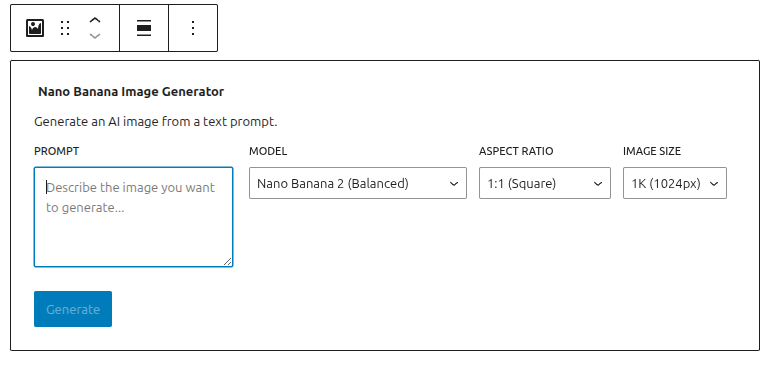
    This morning I built this plugin which is a simple API call to Google’s Gemini AI Studio through a Gutenberg block.

    1. Type your prompt
    2. Choose your model
    3. Hit generate
    4. Insert

    Simple!

    Nano Banana Image Generator block

    Once the image is inserted into the post it turns the block into a standard image block so its as easy to manage as any other image.

    I submitted the plugin to the official WordPress repository but it takes a while to get approved. So, if you want to add it to your own WordPress instance feel free to message me and I’ll give you access to the repository!

    Don’t miss an update

  • Building in Public – The Automated WordPress Deployment Platform Part 2

    Building in Public – The Automated WordPress Deployment Platform Part 2

    A few days ago I wrote about building an automated WordPress deployment platform using Terraform and AI. Well, i’m happy to report that the entire platform is live and ready for you to explore and launch your own WordPress website.

    Introducing 45Squared’s WordPress deployment platform powered by Ubuntu and Claude. Try it out today at https://ai.45sq.net.

    Let’s talk about how this all works.

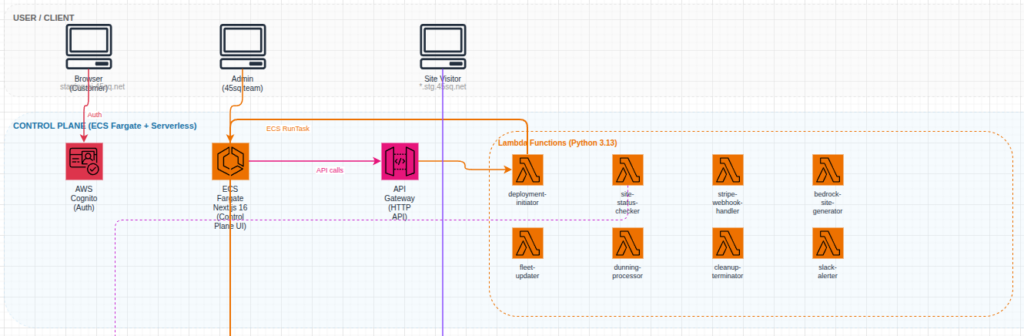
    The front end infrastructure that an end user will see is pretty straightforward. I am utilizing an ECS cluster and NextJS to deliver the end user experience. The second portion of the user experience is handled by an AWS API Gateway to manage all of the user credentials, payment processing, sit launch status. Authentication is handled by AWS Cognito. Hate on it all you want, Cognito works just fine when configured correctly.

    Frontend architecture

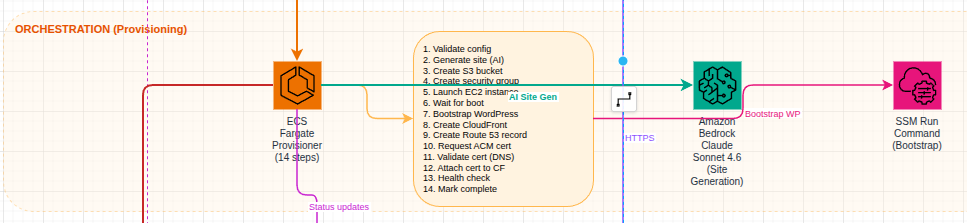
    Behind the scenes, once a user transaction has completed successfully, the website is provisioned using another ECS task. This container runs through a sequence of steps to provision the AWS EC2 instance for the user to utilize. Each tenant instance is running a hardened Ubuntu image that is built using Packer. I will cover this in another post. Throughout the provisioning process, the task is updating the DynamoDB table so that the user gets a live look into how their website is progressing.

    Provisioning architecture

    Each tenant is given a subdomain as well as the ability to utilize a custom domain name. Each tenant is also given a Cloudfront CDN for global static content distribution. And of course, each tenant receives their own SSL certificate for both their custom domain and their subdomain.

    Each site can be managed by SSM which will eventually be linked into an AI agent for management through Slack or another messaging platform.

    I don’t intend to use this platform to compete with the large players. 45Squared’s vision has always been to serve the small to medium size businesses who want personalized support while still receiving an amazing product. This platform gives them the ability to quickly launch a website and get their company on the world wide web within 10 minutes.

    If you are interested in building out a website using the platform the first few users can receive 50% using code “BETATESTER50”. There are limited redemption so be sure to get going quickly!

    Don’t miss an update

  • How I’m Using AI Agents to Run My Side Projects

    I think the promise of AI is to handle the work flows that maybe you don’t have time for. Or, maybe something that’s slightly out of your realm of expertise.

    I read an article the other day that had this quote:

    I keep waiting for someone to walk into my office and tell me what problems I should be solving with AI. Nobody’s come. (link)

    This mind set, in my opinion, is fundamentally incorrect. If you are looking for problems to solve there are a vast number of them and you’ll be drowned in possibility. For me, AI has always been about gaining efficiency or adding capability.

    If you haven’t noticed, I have a lot of side projects. I hope some day one of them hits the jackpot and allows me to retire to an island with all my family and friends. It’s unlikely, but hey, I’m allowed to dream.

    I realized long ago that I’m not great at marketing. I don’t understand lead generation, i’m not super amazing at SEO (so i built a tool for it https://seoscoreapi.com), I’m not in the least bit artistic (that went to my brother (https://mrbenny.co). But what I am good at is problem solving and process creation.

    I’ve been working on a concept of second brain for a while but I realized even a second brain needs to have tools. I started thinking about how to manage all of my side projects and how to interface with them through my preferred platform of Slack. (Sponsor me?).


    I’ve come up with a business development agent that can handle the things that I don’t particularly specialize in. On the backbone of Claude Sonnet 4.6, I created an API Gateway that takes input from my Slack instance and can handle a variety of tasks. 

    • SEO – Using my SeoScoreAPI it can handle generating SEO reports
    • Lead Generation – Using a variety of 3rd party API’s I have it looking for businesses that don’t have websites so I can pitch them some design services. Or, if their SEO is bad I can assist in fixing it
    • Lead nurturing – From the above leads, i get reminded that “Hey – you should connect with this person”
    • AWS Monitoring – It has read access into my AWS organization’s bills so that It can tell me if i’m over spending or just give me weekly overviews
    • WordPress MCP – Each of my managed WordPress instances has the MCP connected to it with read access so that if any of the sites have plugin upgrades, connectivity issues, errors or anything else I can quickly resolve them

    The result of this is quite simple, I’ve added another “worker” to my organization that can help me grow. These aren’t necessarily problems I was having. They are simply areas of work that I struggle with and, they have become easier now thanks to AI.

    If you think this concept is cool, I’ll be setting up a Terraform module soon over at https://aiopscrew.com

    Sign up for the mailing list to be the first one to get the details!

    Don’t miss an update

  • Jenkins Skill for Claude Code

    I’ve been doing a lot more with Claude Code and before you shame me for “vibe coding” hear me out.

    First – AI might be a bubble. But, I’ve always been a slow adopter. Anything that I have AI do, I can do myself. I just find it pointless to spend hours writing Terraform modules when Claude, or another model, can do it in a few seconds. I’ll post more on my workflow in a later blog.

    One of the things that I find tedious is monitoring builds inside of Jenkins. Especially when it comes to troubleshooting. If AI writes the code, it should fix it too right?

    I built a new skill for my Claude Code so that it can view and monitor my locally hosted Jenkins instance and automatically handle any issues. The purpose of this is straight forward. Once I approve a commit to the code base my builds are going to automatically trigger. Claude Code needs to make sure that what it wrote is actually deployed.

    Inside of the markdown file you’ll find examples of how the skill can be used including:

    • List
    • View
    • Start/Stop

    These are all imperative features so that the AI can handle the pipelines accordingly. This has resulted in a significant increase in the time it takes me code and deliver a project immensely. I also don’t have to copy and paste logs back to the AI for it to troubleshoot.

    For you doomers out there – This hasn’t removed me from my job. I still act as the infrastructure architect, the software architect, the primary human tester, the code reviewer and MUCH more.

    Anyway, I’ll be publishing more skills so be sure to star the repository and follow along by subscribing to the newsletter!

    GITHUB

    Don’t miss an update

  • Cloudwatch Alarm AI Agent

    I think one of the biggest time sucks is getting a vague alert or issue and not having a clue on where to start with troubleshooting.

    I covered this in the past when I built an agent that can review your AWS bill and find practical ways to save money within your account. This application wasn’t event driven but rather a container that you could spin up when you needed a review or something you could leave running in your environment. If we take a same read-only approach to building an AWS Agent we can have have a new event driven teammate that helps us with our initial troubleshooting.

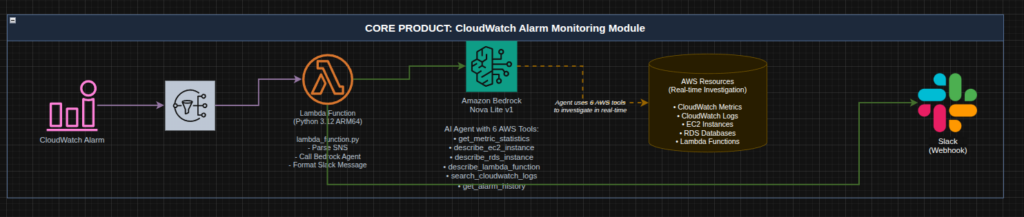
    The process flow is straight forward:

    1. Given a Cloudwatch Alarm
    2. Send a notification to SNS
    3. Subscribe a Lambda function to the topic (this is our teammate)
    4. The function utilizes the AWS Nova Lite model to investigate the contents of the alarm and utilizes its read only capabilities to find potential solutions
    5. The agent sends its findings to you on your preferred platform

    For my environment I primarily utilize Slack for alerting and messaging so I built that integration. Here is an architecture diagram:

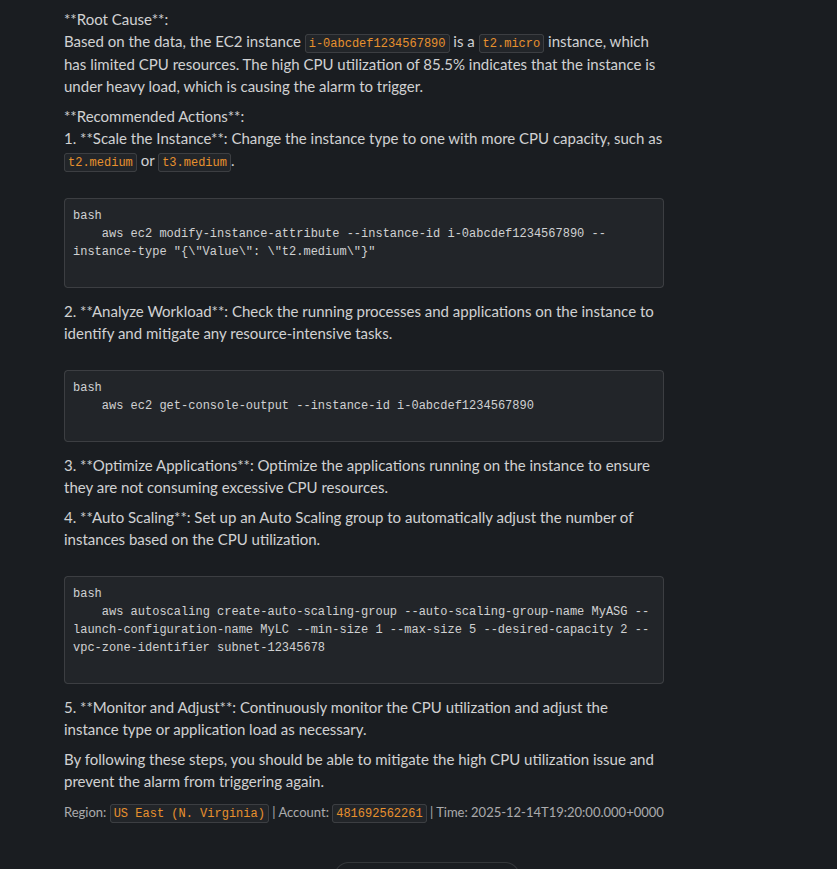
    When the alarm triggers we should see a message in Slack like:

    The AI is capable of providing you actionable steps to either find the root cause of the problem or in some cases, present you with steps to solve the problem.

    This workflow significantly reduces your troubleshooting time and by reducing the troubleshooting time it reduces your downtime.

    So, if this is something you are interested in deploying I have created a Terraform module so you can quickly deploy it into your own environment to reduce your troubleshooting steps!

    Check it out here: https://aiopscrew.com

    If you have questions feel free to reach out to me at anytime!

  • Fantasy Football and AI – Playoffs Round 2

    Well. It had to end at some point.

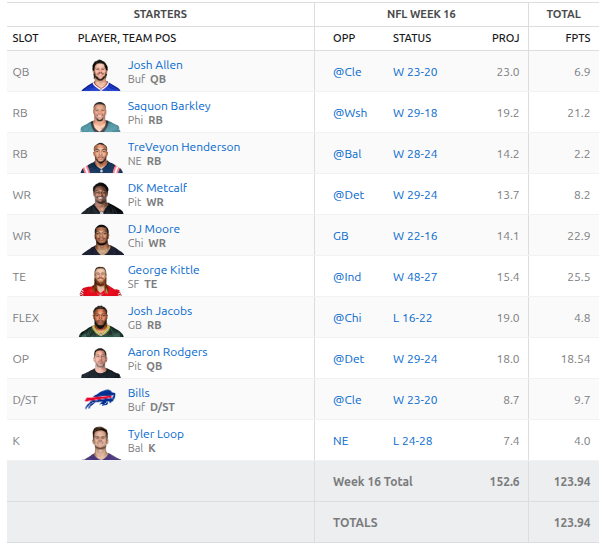
    I think the AI mostly selected correctly this week. Unfortunately it wasn’t enough. We fell short by about 5 points. Going into Monday night we needed a massive game from George Kittle as the rest of the team performed very poorly. He delivered all the way until the 4th quarter where he likely twisted his ankle and was done for the game as the 49ers were up 2 scores.

    Here are the results:

    Josh Allen might have had a foot injury early in the game but stayed in for the entire game. The Bills simply didn’t throw the football. TreVeyon Henderson got absolutely demolished and left the game with a probable concussion. Josh Jacobs was questionable going into the game and cleared to play. The Packers simply didn’t play him.

    With that loss we are eliminated from the playoffs and will be playing next week for 3rd place. Still a decent finish for our first year utilizing AI.

    Looking Ahead

    Through the off season I want to continue to work on the overall architecture of this agent and system. Ideally, I want to have the custom model built for next season and build an API around that to help us make better predictions.

    Other action items:

    1. Find a way to load news stories and story lines for determinations
    2. Manage injuries/waivers better
    3. Handle live NFL standings (teams eliminated from playoffs might play differently than teams fighting for a spot)

    I also would love to be able to expose all of this publicly so that anyone reading can build their own applications around my predictions.

    Stay tuned next week for our final placement!

  • Fantasy Football and AI – Playoffs Round 1

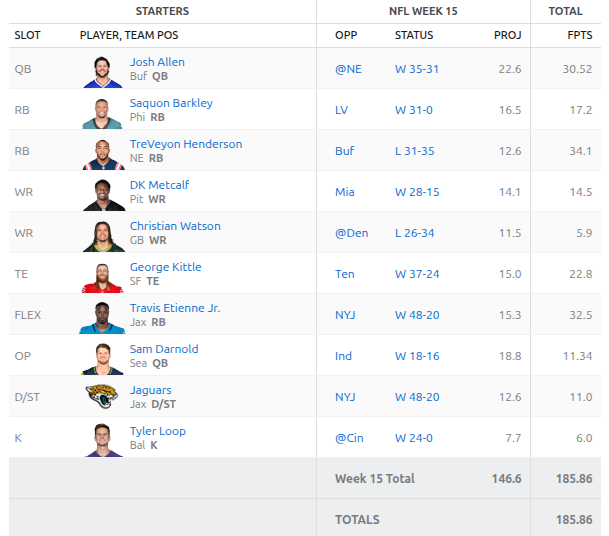
    So I was wrong in last weeks post! Our playoffs started this week. In my league all the teams go to the playoffs and if you lose then there is a loser’s bracket.

    Our AI run team was seeded at number 3. We were in a three way tie for first place and we ended the “regular season” with 2054.76 points. The leader had 2114.12. So, we weren’t far off the front!

    Anyway, enough of that. You all just want to know the outcome. Here is our point totals from our first round in the playoffs:

    I ran the AI on Saturday and it suggested pulling out Josh Jacobs in favor of TreVeyon Henderson. This ended up getting us an extra 10 points. Josh Jacobs still put up 24.2 points this week. Everyone played really well this week except Sam Darnold. I’m not sure if his hot streak is over or what is going on with him but its been rough. Christian Watson took a nasty hit in his game and left early but he is expected to be just fine.

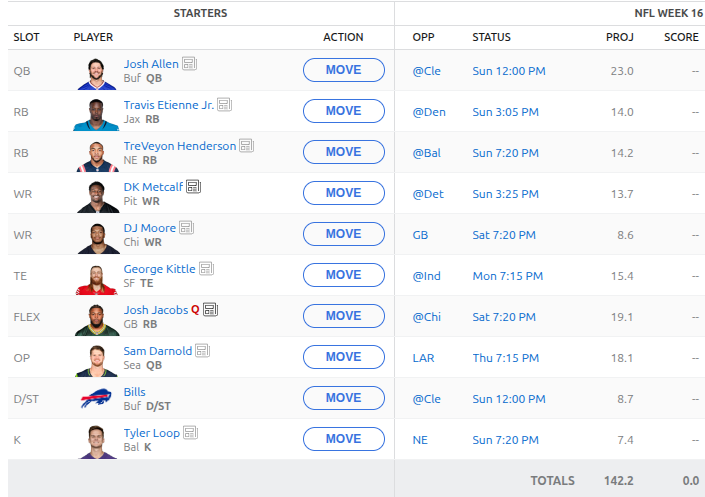
    So, did we win? We sure did! We’re on to the next round of the playoffs and we’re going to be up against Jahmyr Gibbs so we have to hope for our best performance of the season next week. Here is the currently proposed roster:

    We have a lot of injuries and questionable players so I expect this to change. We picked up the Bills defense as they play Cleveland and they should have a good time against that struggling offense.

    As we look to the off season I hope to build up my API website https://gridirondata.com and start training the model that we will use for next year. I have been working on the overall workflow and looking into how I can have both the scrapers running in the cloud and in my homelab so that I can easily work with the data locally and not incur a lot of cloud cost.

    Stay tuned for more Fantasy Football news next week!

  • Fantasy Football and AI – Week 14

    Happy Wednesday. Victory Wednesday that is! Our AI selected correctly this week and we snuck in a tough win that was finalized on Sunday night.

    Unfortunately, we lost Zach Ertz on the way. A really nasty low hit took him out for the year. Here is the final scores for our lineup:

    Josh Allen came up huge for us. Breece Hall was useless and the Commanders defense might as well have never stepped out on the field. But, a win is a win! We are now in a 3 way tie for first place but will likely take the third seed into the playoffs given our total fantasy points.

    Here is the lineup for week 15: We’ve had to make some changes from waivers and I’m hoping the AI selected correctly. We are heading into the part of the season where teams are going to be fighting for playoff spots. I hope that it is taking that into account as it made the waiver picks.

    We have some highly projected players this week. What do you think? Will we be able to pull off another win this week?