Category: Amazon Web Services

  • AWS Transform is the wrong tool for the job you actually have

    AWS Transform is the wrong tool for the job you actually have

    First off, I want to say I love Amazon Web Services, Kiro, and any effort that makes migrations from legacy to modern tech stacks. But, I also like the counter argument.

    AWS launched AWS Transform as “a collaborative enterprise IT transformation workbench powered by expert agents.” It promises to modernize your .NET apps 5x faster, shrink mainframe projects from “years to months,” and automate VMware migrations end to end. The marketing page claims 4.5 billion lines of code analyzed and 1.69 million hours of manual effort saved in the last twelve months.


    I’ve read the pitch. I’ve watched a couple of demos. I think most teams considering it should walk away, and I want to explain why —
    and what to do instead.

    What AWS Transform actual is

    Strip the agentic-AI gloss off and Transform is three things bundled together:

    1. A discovery and assessment layer that scans your existing estate (codebases, VMs, dependencies).
    2. A set of pre-built “agents” that perform specific transformations: .NET Framework → .NET on Linux, COBOL → Java, VMware →
      EC2, Java 8 → Java 21, and so on.
    3. A workbench (web console plus Kiro IDE integration) where humans review and approve agent output.

    It’s a continuation of a lineage: Migration Hub, MGN, App2Container, the old Microsoft Workloads tooling, the original CodeWhisperer transformation features. AWS keeps reshuffling these into new umbrella brands. Transform is the 2026 wrapper.

    That history matters, because it tells you something about the half-life of the product you’re betting on.

    My core objection: the output is shaped like AWS

    When you let an agent translate a COBOL batch job into Java, or a .NET Framework service into .NET on Linux, you don’t just get “modern code.” You get code that looks the way AWS’s agent decided modern code should look. The data access patterns it picks, the logging conventions, the way it splits modules, the runtime targets it assumes — all of that is now baked into your codebase, and none of it was a decision your team made.


    This is fine if you’re a hands-off shop that’s going to run whatever comes out the other end. It’s a disaster if you intend to own and evolve the system afterward. You will spend the next three years asking “why is it like this?” and the answer will be “because an agent decided in May 2026.”


    There’s a deeper version of this problem with mainframe and VMware work. The agent doesn’t just translate code — it picks the AWS-native destination. Step Functions instead of your existing scheduler. DynamoDB instead of “let’s think about whether this data actually fits a KV store.” Network conversion that assumes you want VPC-native everything. These are not neutral technical choices; they are commercial decisions made on AWS’s behalf, inside your repo.

    The metrics are a vendor-pitch, not a forecast

    “5x faster.” “70% lower operating costs.” “Years to months.”


    Every modernization vendor has said versions of these numbers for twenty years. They are real for the case study they came from. They are almost never what you will personally experience, because:

    • The 70% cost reduction usually compares licensed Windows Server + SQL Server Standard on owned hardware against Linux +
      an open-source database on Graviton. Most of the savings come from switching the license model, not from anything
      Transform does. You can capture that yourself.
    • The “5x faster” number is measured against a baseline of “team that has never done this before, doing it manually.” If your
      team has done a .NET migration once, your real multiplier is closer to 1.5x.
    • The mainframe-to-Java case studies almost always involve workloads that were already partially decomposed. The genuinely
      tangled mainframes the ones where modernization is actually hard are not the ones that ship as case studies.

    If a vendor’s headline metric needs four asterisks to be accurate, it isn’t really a metric.

    Modernization that skips understanding is just translation

    The thing I dislike most about Transform, and about agentic modernization in general, is that it lets you finish a project without anyone on your team understanding what they now own.


    When a senior engineer spends six months untangling a COBOL system to port it, the porting is half the value. The other half is that, at the end, someone in the building understands the system. They know where the landmines are. They can answer questions in incident review. They can tell product what’s safe to change.

    If an agent does the port, you get code on the other side and an organization that is no smarter than it was before. Worse: you now
    have a Java codebase that nobody wrote and nobody fully grasps, sitting on top of business logic nobody re-derived. The first production incident will be ugly.

    This is the same complaint people have about outsourced rewrites, and it applies cleanly to agent-driven ones.

    The Kiro and tooling lock-in

    Transform leans on Kiro, AWS’s IDE, with “pre-built playbooks.” Adopting Transform meaningfully means asking your engineers to learn Kiro, to work inside AWS’s review workflow, and to accept handoffs in a format that’s optimized for AWS’s agents to re-enter later.


    That’s a real switching cost. Two years from now, when AWS rebrands Transform into whatever comes next, those playbooks and that workflow knowledge depreciate fast.

    What to do instead

    I’m not arguing for “do nothing” or “stay on the mainframe forever.” Modernization is often the right call. But the right shape is almost always:

    1. Do the assessment yourself, or with a consultancy you’d hire anyway. The discovery piece of Transform is the least controversial part — but it’s also the part you most want to own. Knowing your own estate is a permanent capability. Renting it from an agent is not.
    2. Use general-purpose coding agents under human direction, not vertical modernization agents. Claude Code, Cursor, Copilot in agent mode these are genuinely useful for the grunt work of a migration (rewriting a thousand similar files, fixing a known refactor pattern, translating tests). The difference is that your engineer is driving, deciding the target architecture, and reading the output. The agent is a force multiplier, not a contractor.
    3. Small wins, not big-bang. Pick the highest-pain module. Modernize it. Run it alongside the old system. Cut over. Repeat. This is slower on paper than “let the agent do it all,” but it produces a team that understands the new system at each step. And you can stop whenever the remaining legacy stops costing you money — which, for a lot of mainframe workloads, is the honest answer.
    4. Separate the license/runtime change from the architecture change. If most of your savings come from leaving Windows + SQL Server, do that migration as its own project. Don’t let it get bundled with a re-architecture, because the re-architecture is where the risk lives and you want it isolated.
    5. Be honest about workloads that shouldn’t move. Some legacy systems are stable, cheap to run, and changed once a quarter. Modernizing them is a status project, not a value project. Transform’s marketing will never tell you this; a good architect will.

    TLDR:

    AWS Transform is well-engineered. The agents work. The demos are real. None of that is the question.


    The question is whether you want to end a multi-year modernization with a codebase shaped by AWS’s opinions, a team that didn’t learn the system, and a tooling dependency on a product line AWS will rename in two years.

    For most teams I’ve worked with, the answer is no. Use agents — yours, under your control — to make your own engineers faster. Keep the architectural decisions in the building. Skip the workbench

    Questions? Let me know.

    Don’t miss an update

  • The state of SEOScoreAPI – An OpenClaw Project

    The state of SEOScoreAPI – An OpenClaw Project

    If you remember, I did an experiment with OpenClaw. I let it have access to build anything it wanted with a single EC2 instance. It built https://seoscoreapi.com which is a fantastic tool for checking the status of your websites SEO.

    Initially I thought I would scrap the project and just let the domain expire. But I started doing some manual promotion after OpenClaw spent over $200 and got the first paid user! Since then I’ve put a few hours a day promoting and adding some features.

    What’s New

    The last few months have been the most productive stretch since launch. Here’s what shipped:

    ADA Accessibility Audits

    This one came from watching the news. ADA website lawsuits hit over 4,000 in 2025 and they’re still climbing. Small businesses, e-commerce sites, local restaurants — everyone’s a target.

    We built a full WCAG 2.1 AA compliance endpoint that injects axe-core (the industry-standard accessibility engine) into a headless browser and scans the rendered page. It returns a compliance score, a lawsuit risk assessment, category breakdowns across 10 areas (color contrast, forms, keyboard navigation, ARIA, etc.), and specific fix suggestions for every violation.

    We ran it on our own site first. Scored a 71. Found contrast issues, links that weren’t distinguishable from body text, a misused aside element. Fixed everything. Now we score 100. That’s the point — even developers who care about accessibility miss things.

    Available on all paid plans. Starter gets 5/month, Ultra gets 500.

    GEO (Generative Engine Optimization)

    Traditional SEO gets you into Google. GEO gets you into ChatGPT, Claude, Perplexity, and every RAG pipeline pulling from the web.

    The GEO audit checks 26 factors across four categories: crawl accessibility, structural markup, content extractability, and AI discoverability. It answers questions like: Do you have an llms.txt file? Is your content chunked in a way that RAG systems can ingest? Do you have freshness signals? Are AI crawlers even allowed in your robots.txt?

    This is becoming more relevant every month. Traffic from AI systems is growing and most sites aren’t optimized for it at all.

    Competitive Audits

    You can now audit your site against competitors in a single request. The response shows a side-by-side comparison with score differentials, category-by-category breakdowns, and which specific checks you’re winning or losing on. Useful for agencies pitching prospects and for anyone doing competitive analysis.

    What’s Next

    Honestly I’m not sure. I would love to get more people using the service. Possibly some more integrations, a WordPress plugin?

    Try It

    If you’ve read this far, go audit your site: seoscoreapi.com

    The demo on the homepage doesn’t require a signup. Type in your URL, see your score, read the priorities list. If you want API access, the free tier takes 30 seconds to set up — just an email and a verification code.

    If you’re a developer, the docs have everything. Python and Node.js SDKs are on PyPI and npm. The GitHub Action is at SeoScoreAPI/seo-audit-action.

    If you have questions or feedback, I’m at aaron@seoscoreapi.com.

  • Evolution of my build failure agent

    Evolution of my build failure agent

    I’ve written in the past about troubleshooting build pipelines with AI. While all of this is a great step in speeding up your development and reducing the amount of troubleshooting the DevOps team needs to do in the enterprise, it is NOT the end goal.

    The end goal would be to have the AI fix the problem for you.

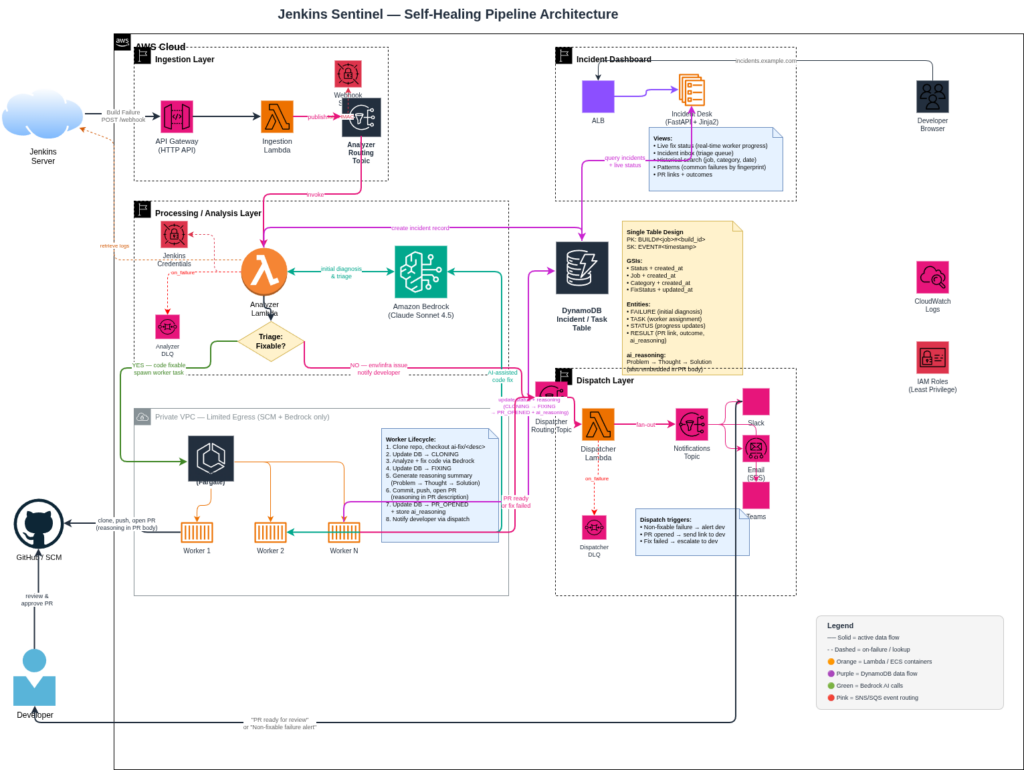
    I’m rebranding my Jenkins Sentinel to just be Sentinel. This workflow allows you to automate remediation for your pipelines while still retaining human in the loop security.

    The other primary feature is storing your build failures and remediations in a database that you can view, update, analyze for custom model training.

    Originally we had the dispatch layer that would notify us of build failures and possible resolutions. The new addition is the cluster of “workers”. Running on AWS Fargate, this team of developers works with the LLM on Bedrock to resolve the failure.

    1. The task spins up in the cluster
    2. The build logs identify the repository and branch
    3. The repository is cloned, and branch checked out
    4. The code fix is implemented
    5. The task generates its reasoning and updates the database accordingly
    6. Code is committed to a new branch and a pull request is opened.
    7. The task cleans up and shuts down

    Dispatch still remains the same and the developer is notified accordingly. I need to implement developer specific notifications so that channels are not flooded or email lists abused.

    The other major thing I wanted to see was the cost per fix.

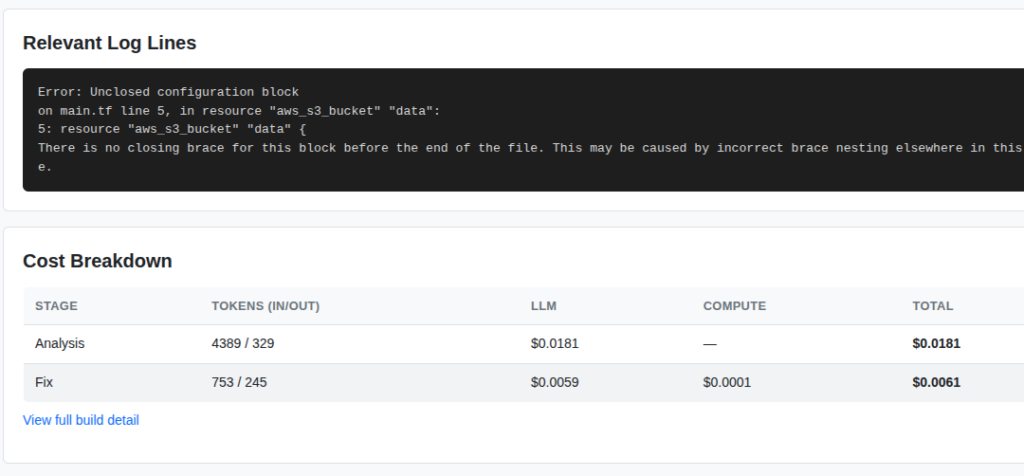
    This screenshot is from the dashboard which shows the compute spend and the LLM spend. For this simple Terraform fix you can see the was a little around $0.02. Assuming your code bases are more complex this value could increase proportionally.

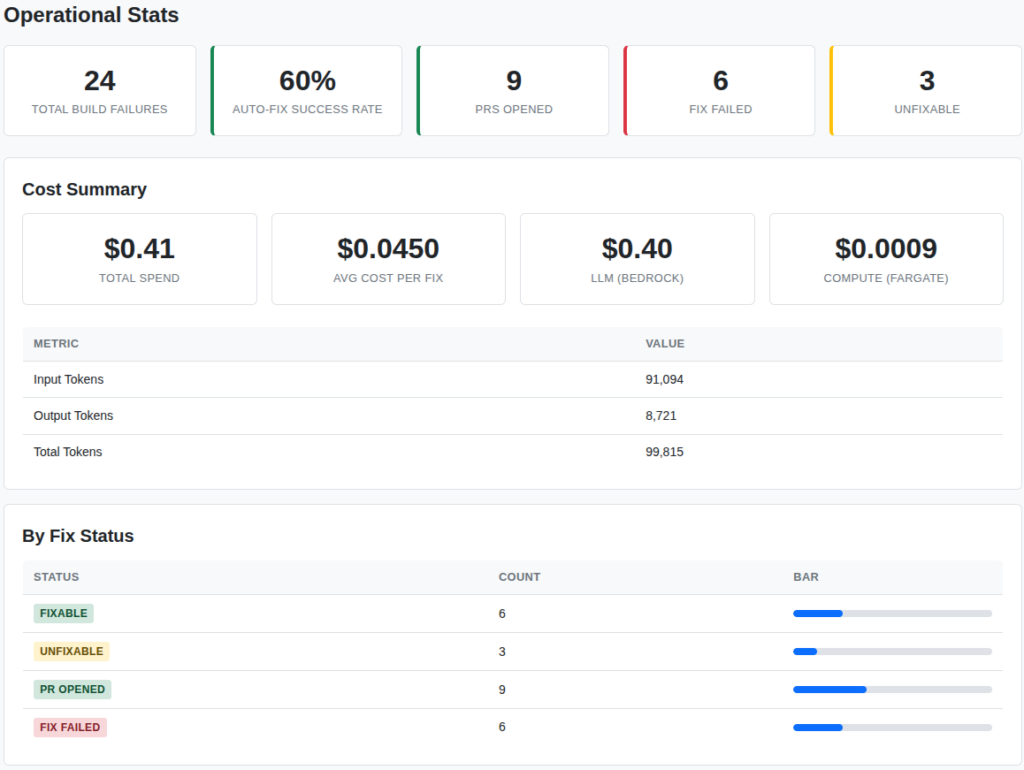
    I also included a stats page which shows the totals for the entire organization.

    This is all real data from my testing project. The build agent is successfully troubleshooting pipelines for:

    • Python
    • Terraform
    • Java
    • Typescript
    • Docker
    • Kubernetes
    • Go
    • Cloudformation

    I plan to continue to add more supported platforms and languages as time allows. The other major integration that I am working on is support for GitHub Actions. Once I complete that integration and put this into all of my pipelines I expect that my troubleshooting and development time will decrease rapidly.

    Other future plans include:

    • Ingestion of bugs through sources like Jira, ToDoist (my favorite), or another ticketing system.
    • Discord Dispatching
    • Teams Dispatching – although this is really hard to develop for without a paid account
    • Custom model – using the build failure data to train a model

    Anyway, this project has been super fun. If you want to implement it on your own infrastructure feel free to reach out!

    Don’t miss an update

    PS: the featured image was generated and setup through my Nano Banana WordPress plugin

  • Why I built my own WordPress Platform

    Why I built my own WordPress Platform

    I’ve been building websites for a long time. I remember learning HTML and Microsoft FrontPage as my first website builder. It was such a fun time to be creating horrific looking websites back in the early 2000s. As the internet progressed so did my skills and back in 2016 I formed my company 45Squared to build websites for small businesses. My whole goal is to be your trusted resource when it comes to being online.

    When I started the company I built WordPress websites of various shapes and sizes but they always ran on AWS. This helped me expand my AWS skills as well as provide robust infrastructure for my client’s websites to live on. I managed the website and the underlying infrastructure for a small monthly cost that beat the competition. The result, a bunch of paying customers a decent side hustle.

    As time went on, selling became harder and the race to zero for cost was apparent. So, as the AI boom is on, I decided that it was time to automate the site building process.

    I started documenting out how I would want this to work. Fully automated website deployments, design, content, custom domains, good SEO base and deployed FAST!

    Enter https://ai.45sq.net. This platform is fully automated. The customer can provide inputs and descriptions of what they want as well as photos or other graphical content. The workflow takes all of the inputs and builds a fully functional WordPress website hosted on AWS. The user can easily point their own domain to the server and setup automatic payments. They then get full administrative access to their website so they can expand and add features just like any other WordPress site.

    So why did I build this?

    If you contact a web designer now you will have to pay them to build up the initial design, work with their timelines, end up with something that needs revisions and your time to live will be in the weeks not minutes.

    The platform I built for 45Squared eliminates the need for the initial design fees and focuses on getting you online quickly. Its great for small businesses who are just getting started.

    So now when I get a request to build a site I can tell the customer that I have two options. First, fully custom. I’m still willing to sit with you and build out the picture perfect website. Or, two, you can launch your own and I will still support the website and help you with your online presence.

    So that’s it. An easy to use WordPress website launcher. Running on enterprise grade cloud. With content, design, layout and all the rest handled by the magic of Claude Opus.

    Try it out: https://ai.45sq.net. No contracts. No weird fees. Get online today.

  • Building in Public – The Automated WordPress Deployment Platform Part 2

    Building in Public – The Automated WordPress Deployment Platform Part 2

    A few days ago I wrote about building an automated WordPress deployment platform using Terraform and AI. Well, i’m happy to report that the entire platform is live and ready for you to explore and launch your own WordPress website.

    Introducing 45Squared’s WordPress deployment platform powered by Ubuntu and Claude. Try it out today at https://ai.45sq.net.

    Let’s talk about how this all works.

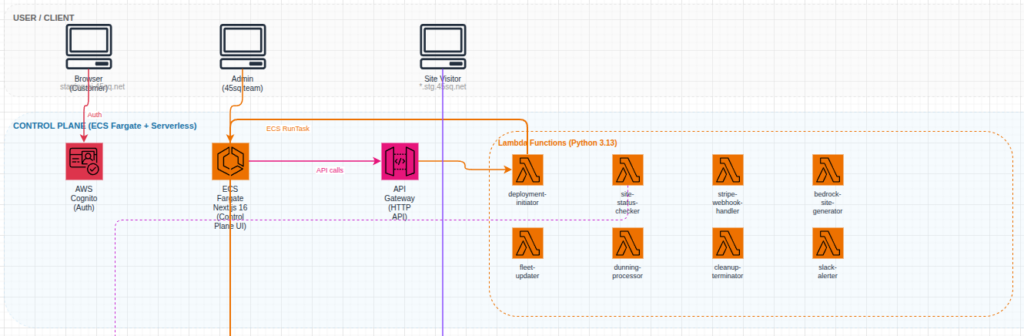
    The front end infrastructure that an end user will see is pretty straightforward. I am utilizing an ECS cluster and NextJS to deliver the end user experience. The second portion of the user experience is handled by an AWS API Gateway to manage all of the user credentials, payment processing, sit launch status. Authentication is handled by AWS Cognito. Hate on it all you want, Cognito works just fine when configured correctly.

    Frontend architecture

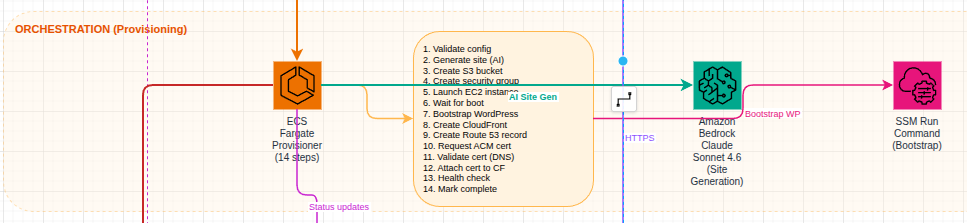
    Behind the scenes, once a user transaction has completed successfully, the website is provisioned using another ECS task. This container runs through a sequence of steps to provision the AWS EC2 instance for the user to utilize. Each tenant instance is running a hardened Ubuntu image that is built using Packer. I will cover this in another post. Throughout the provisioning process, the task is updating the DynamoDB table so that the user gets a live look into how their website is progressing.

    Provisioning architecture

    Each tenant is given a subdomain as well as the ability to utilize a custom domain name. Each tenant is also given a Cloudfront CDN for global static content distribution. And of course, each tenant receives their own SSL certificate for both their custom domain and their subdomain.

    Each site can be managed by SSM which will eventually be linked into an AI agent for management through Slack or another messaging platform.

    I don’t intend to use this platform to compete with the large players. 45Squared’s vision has always been to serve the small to medium size businesses who want personalized support while still receiving an amazing product. This platform gives them the ability to quickly launch a website and get their company on the world wide web within 10 minutes.

    If you are interested in building out a website using the platform the first few users can receive 50% using code “BETATESTER50”. There are limited redemption so be sure to get going quickly!

    Don’t miss an update

  • Building In Public – Designing an automated WordPress deployment engine with Terraform

    If you didn’t know I built a lot of technical experience by building out WordPress websites. I started a business around it. I did quite well. Lately, I’ve been trying to get back into building websites for small businesses. I find that the space of AI has made some of the bigger players too complex even though they claim to be easy.

    My goal is to create a single web page where a user can describe their website and have it auto provision a full WordPress instance build upon core AWS services. The end result will be a fully managed WordPress instance, backed by AWS’s 99.999% up time. It will be fully automated and take around 10 minutes to have a fully developed website.

    Current Architecture Plans:

    I’m utilizing AWS to handle everything (no surprise). Originally I was going to utilize Step Functions as the provisioner but as I started building I ended up hitting too many roadblocks and restrictions from a timing perspective.

    When dealing with Bedrock the response times can vary. So I made the switch to go with an ECS approach. The control plan/signup page is built there so the provisioner should also just be another task.

    Features:

    • Custom Domains
    • Automated SSL
    • Load balancers
    • Auto healing (through auto scaling)
    • Monitoring

    Essentially all the standard features you would expect from a web host. Just without the design portion.

    This will be a new ongoing series for you all to read about. If you’re interested in following along subscribe to my mailing list!

    Don’t miss an update

  • Cloudwatch Alarm AI Agent

    I think one of the biggest time sucks is getting a vague alert or issue and not having a clue on where to start with troubleshooting.

    I covered this in the past when I built an agent that can review your AWS bill and find practical ways to save money within your account. This application wasn’t event driven but rather a container that you could spin up when you needed a review or something you could leave running in your environment. If we take a same read-only approach to building an AWS Agent we can have have a new event driven teammate that helps us with our initial troubleshooting.

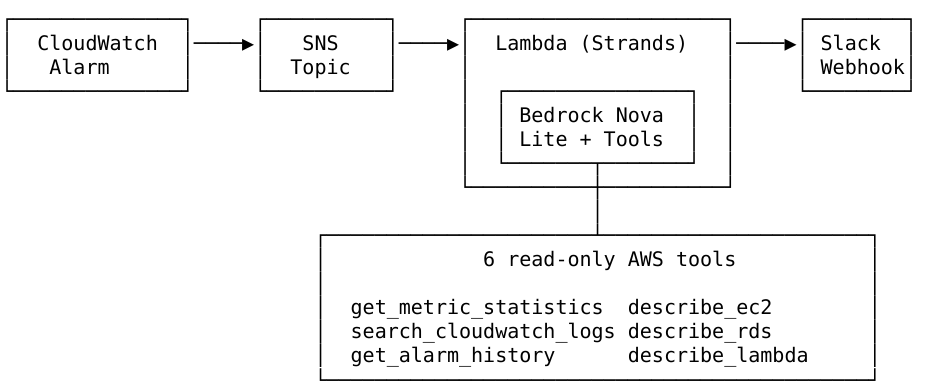
    The process flow is straight forward:

    1. Given a Cloudwatch Alarm
    2. Send a notification to SNS
    3. Subscribe a Lambda function to the topic (this is our teammate)
    4. The function utilizes the AWS Nova Lite model to investigate the contents of the alarm and utilizes its read only capabilities to find potential solutions
    5. The agent sends its findings to you on your preferred platform

    For my environment I primarily utilize Slack for alerting and messaging so I built that integration. Here is an architecture diagram:

    When the alarm triggers we should see a message in Slack like:

    The AI is capable of providing you actionable steps to either find the root cause of the problem or in some cases, present you with steps to solve the problem.

    This workflow significantly reduces your troubleshooting time and by reducing the troubleshooting time it reduces your downtime.

    So, if this is something you are interested in deploying I have created a Terraform module so you can quickly deploy it into your own environment to reduce your troubleshooting steps!

    Check it out here: https://aiopscrew.com

    If you have questions feel free to reach out to me at anytime!

  • Fantasy Football and AI – Playoffs Round 2

    Well. It had to end at some point.

    I think the AI mostly selected correctly this week. Unfortunately it wasn’t enough. We fell short by about 5 points. Going into Monday night we needed a massive game from George Kittle as the rest of the team performed very poorly. He delivered all the way until the 4th quarter where he likely twisted his ankle and was done for the game as the 49ers were up 2 scores.

    Here are the results:

    Josh Allen might have had a foot injury early in the game but stayed in for the entire game. The Bills simply didn’t throw the football. TreVeyon Henderson got absolutely demolished and left the game with a probable concussion. Josh Jacobs was questionable going into the game and cleared to play. The Packers simply didn’t play him.

    With that loss we are eliminated from the playoffs and will be playing next week for 3rd place. Still a decent finish for our first year utilizing AI.

    Looking Ahead

    Through the off season I want to continue to work on the overall architecture of this agent and system. Ideally, I want to have the custom model built for next season and build an API around that to help us make better predictions.

    Other action items:

    1. Find a way to load news stories and story lines for determinations
    2. Manage injuries/waivers better
    3. Handle live NFL standings (teams eliminated from playoffs might play differently than teams fighting for a spot)

    I also would love to be able to expose all of this publicly so that anyone reading can build their own applications around my predictions.

    Stay tuned next week for our final placement!

  • Fantasy Football and AI – Week 13

    Sigh… another week another loss. It was a close one. It turns out people just didn’t really show up to play.

    Its hard to win a game when your high scorer is a defense. There was some light at the end of the Patriots game when Henderson was running down the field. Unfortunately they took him out and then the drive stalled. Had he been able to get a touch down we could have won. We left some points on the bench as well:

    Zach Ertz had a monster game and many of the other players would have been better than Saquon.

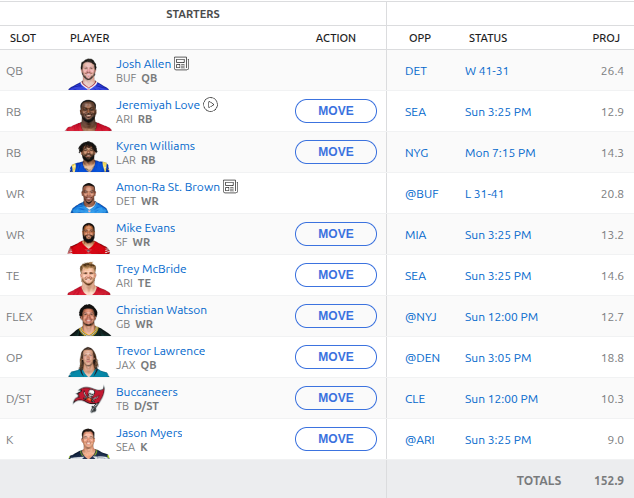
    On to week 14. This is the last week before our playoff run. Here is the current proposed roster:

    Its hard to not start Saquon Barkley. But he’s trending down and I think I agree with the AI here in not selecting him. Marvin Harrison Jr. is questionable again due to his surgery but is expected to play. We grabbed Christian Watson, Marcus Mariota and the Commanders defense for week 14. We dropped J.J. McCarthy due to poor performance and injury. Henderson is on bye this week. Our current bench looks like this:

    What do you think? Do you agree with the AI’s selections for the week?

  • Fantasy Football and AI – Week 12

    Well, unfortunately we took a big loss and are now in a three way tie for first place. Here are the actual results:

    I think the biggest hit was how poorly Josh Allen played. What is interesting is that I was reviewing his passed performance against Houston and he has had his worst outings of his career there. This week was no different… The other interesting thing is that Saquon Barkley just isn’t the same back as he was last year. He is trending down.

    In response to Josh Allen’s poor outing I added a deviation and historical performance analysis against and opponent to the data set so now we have a value like:

    "HOU": {
       "avg_actual": 11.6,
       "avg_deviation": -2.67,
       "avg_deviation_percentage": -18.69,
       "avg_projected": 14.27,
       "by_season": {
        "2024": {
         "avg_actual": 14.6,
         "avg_deviation": 0,
         "avg_deviation_percentage": 0,
         "avg_projected": 0,
         "games_played": 1,
         "games_with_projections": 0
        },
        "2025": {
         "avg_actual": 5.05,
         "avg_deviation": -5.65,
         "avg_deviation_percentage": -52.8,
         "avg_projected": 10.7,
         "games_played": 2,
         "total_actual": 10.1,
         "total_projected": 21.4
        }
       },

    I then coded a new tool inside of the AI to reference this data set to assist with its final calculations.

    So, when we ask the tool about Josh Allen’s performance against a team we get something like:

    Found exactly what you're looking for in Josh Allen's performance data.
    
    Josh Allen vs Kansas City (Week 9, 2025):
    - 28.8 fantasy points - That's a STRONG performance!
    - He was projected for 22.0 points but exceeded by 6.8 points (+30.9%)
    - This was one of his better games this season
    
    Historical Context (2024 vs KC):
    - Week 11, 2024: 24.0 fantasy points vs Kansas City
    
    Bottom Line: Josh Allen has performed WELL against Kansas City in recent matchups. In their two most recent meetings:
    - 2025 (Week 9): 28.8 points
    - 2024 (Week 11): 24.0 points
    
    That's an average of 26.4 fantasy points against KC - well above his season average. Allen seems to rise to the occasion against elite competition like Kansas City. The Chiefs' defense can be vulnerable to mobile QBs who can extend plays, and Allen's dual-threat ability has historically given them problems.
    
    The takeaway: When Allen faces KC, he typically delivers QB1 numbers. That 28.8-point performance this season shows he can still light up even the defending champs!

    I need to backload some more historical data yet but that is a problem for a different day. Looking forward, I hope to build my own model based on this data and setup an automated workflow that will include data ingestion and automated model building so that I can consistently build predictions.

    So, on to week 13. We have a bunch of injuries this week to contend with so this lineup will likely be changing once people are reporting. Here is the current lineup:

    In other news I built and launched https://gridirondata.com which is an API to reference all of the data I have collected so far.

    Unfortunately, its not free. But if you message me about it I’ll probably hook you up!