Category: Agents

  • How I utilize Claude Code and AI to build complex applications

    “A Fever You Can’t Sweat Out – 20th Anniversary Deluxe” is an album that came out? Wow. I remember seeing Panic! as a teenager…

    I stayed away from AI for a long time. I think a lot of people in my field were nervous about security, bad code, incorrect information and much more. In the early days of ChatGPT it was easy to have the AI hallucinate and come up with some nonsense. While its still possible for this to happen I found a workflow that has helped me build applications and proof of concept work very quickly.

    First – I have always given AI tasks that I can do myself.
    Second – If I can’t do a task, I need to learn about it first.

    These aren’t really rules, but, things I think about when I’m building out projects. I won’t fall victim to the robot uprising!

    Let’s talk about my workflows.

    Tools:
    – Claude (Web)
    – Claude Code
    – Gemini
    – Gemini CLI
    – ChatGPT
    – Todoist

    I pay for Claude and I have subscriptions to Gemini Pro through my various GSuite Subscriptions. ChatGPT I use for free. ToDoist is my to do app of choice. I’ve had the subscription since back in my Genius Phone Repair days to manage all of the stores and their various tasks.

    The Flow

    As with most of you, I’m sure you get ideas or fragments of ideas at random times. I put these into ToDoist where I have a project called “Idea Board” its basically a simplified Kanban board with three columns:

    Idea | In progress | Finished

    The point of this is to track things and get them out of my brain to free up space in there everything else that happens in my life. I utilize the “In Progress” column for when I’m researching or actually sitting down to process the idea with more detail. Finally, the “Finished” column is utilize for either ideas that I’m not going to work on or ideas that have turned into full projects. This is not the part of the project where I actually detail out the project. It’s just a landing place for ideas.

    The next part of the flow is where I actually detail out what I want to do. If you have been utilizing Claude Code or Gemini CLI or Codex you know that input is everything and it always has been since AI became consumer ready. I generally make a folder on my computer and start drafting my ideas with more detail into markdown files. If we look at CrumbCounts.com as an example, I started with simply documenting out the problem I was trying to solve:

    Calculate the cost for this recipe.

    In order to do that we then need to put a bunch of pieces together. Because I am an AWS Fanboy most of my designs and architectures revolve around AWS but some day I might actually learn another cloud and then utilize that instead. Fit for purpose.

    Anyway, the markdown file will continually grow as I start to build the idea into a mostly detailed out document that lays out the architecture, design principals, technologies to utilize, user flow and much more. The more detail the better!

    When I am satisfied with the initial idea markdown file I will provide it to Gemini. Its not my favorite AI model out there but it possess the ability to take in and track a large amount of context which is useful when presenting big ideas.

    I assign Gemini the role of “Senior Technology Architect”. I assume the role of “stakeholder”. Gemini’s task is to review the idea that I have and either validate or, create the architecture for the idea. I prompt it to return back a markdown file that contains the technical architecture and technical details for the idea. At this point we reach our first “Human in the loop” point.

    Because I don’t trust our AI overlords this is the first point at which I will fully review the document output by Gemini. I need to make sure that what the AI is putting out is valid, will work, and is using tools and technology that I am familiar with. If the output is proposing something that i’m unsure of I need to research or ask the AI to utilizing something else.

    After I am satisfied with the architecture document I place that into the project directory. This is where we change AI Models. You see Gemini is good at big picture stuff but not so good at specifics (in my opinion). I take the architecture document and provide it to Claude (Opus, web browser or app) and give it the role of Senior Technology Engineer. Its job is to review the architecture diagram, find any weak points or things that are missing or, sometimes, things that just won’t work. Then build a report and an engineering plan. This plan details out SPECIFIC technologies, patterns and resources to use.

    I usually repeat this process a few times and review each LLM’s output looking for things that might have been missed by either myself or the AI. Once I have them both in a place that I feel confident this is when I actually start building.

    Because I lack trust in AI, I make my own repository in GitHub and setup the repository on my local machine. I do allow the AI the ability to commit and push code to the repository. Once the repository has been created I have Gemini CLI build out the application file structure. This could include:

    • Creating folders
    • Creating empty files
    • Creating base logic
    • Creating Terraform module structures

    But NOTHING specific. Gemini, once again, is not good at detailed work. Maybe i’m using it wrong. Either way, I now have all of the basic structure. Think of Gemini as a Junior Engineer. It knows enough to be dangerous so it has many guardrails.

    # SAMPLE PROMPT FOR GEMINI
    You are a junior engineer working on your first project. Your current story is to review the architecture.md and the enginnering.md. Then, create a plan.md file that details out how you would go about creating the structure of this application. You should detail out every file that you think needs to be created as well as the folder structure. 

    Inside of the architecture and engineering markdown files there is detail about how the application should be designed, coded, and architected. Essentially a pure runbook for our junior engineer.

    Once Gemini has created its plan and I have reviewed it, I allow it write files into our project directory. These are mostly placeholder files. I will allow it to write some basic functions for coding and layout some Terraform files that are simple.

    Once our junior engineer, Gemini, has completed I usually go through and review all of the files against the plan that it created. If anything is missing I will direct it to review the plan again and make any corrections. Once the code is at a place where I am happy with it, I create my first commit and push this baseline into the repository.

    At this point its time for the heavy lifting. Time to put my expensive Anthropic subscription to use. Our “Senior Developer” Claude (Opus model) is let loose on the code base to build out all the logic. 9 times out of 10 I will allow it to make all the edits it wants and just let it go while I work on something else (watching YouTube).

    # SAMPLE CLAUDE PROMPT
    You are a senior developer. You are experienced in many application development patterns, AWS, Python and Terraform. You love programming and its all you ever want to do. Your story in this sprint is to first review the engineering.md, architecture.md and plan.md file. Then review the Junior Engineer's files in this project directory. Once you have a good grasp on the project write your own plan as developer-plan.md. Stop there and I, your manager, will review.

    After I review the plan I simply tell it to execute on the plan. Then I cringe as my usage starts to skyrocket.

    Claude will inevitably have an issue so I take a look at it every now and then, respond to questions if it has any or allow it to continue. Once it reaches a logical end I start reviewing its work. At this point it should have built me some form of the application that I can run locally. I’ll get this fired up and start poking around to make sure the application does what I want it to do.

    At this point we can take a step back from utilizing AI and start documenting bugs. If I think this is going to be a long project this is where I will build out a new project in Todoist so that I can have a persistent place to take notes and track progress. This is essentially a rudimentary Jira instance where each “task” is a story. I separate them into Bugs, Features, In Progress, Testing.

    My Claude Code utilizes the Todoist MCP so it can view/edit/complete tasks as needed. After I have documented as much as I can find I let Claude loose on fixing the bugs.

    I think the real magic also comes with automation. Depending on the project I will allow Claude Code access to my Jenkins server via MCP. This allows Claude code to monitor and troubleshooting builds. This allows Claude to operate independently. What happens is that it will create new branches and push them into a development environment triggering an automated deployment. The development environment is simply my home lab. I don’t care if anything breaks there and it doesn’t really cost any money. If the build fails, Claude can review the logs and process a fix and start the CI/CD all over again.

    Ultimately, I repeat the bug fix process until I get to my minimal viable product state and then deploy the application or project into whatever is deemed the production environment.

    So, its 2026, we’re using AI to build stuff. What is your workflow? Still copying and pasting? Not using AI at all? AI is just a bubble? Feel free to comment below!


  • Jenkins Skill for Claude Code

    I’ve been doing a lot more with Claude Code and before you shame me for “vibe coding” hear me out.

    First – AI might be a bubble. But, I’ve always been a slow adopter. Anything that I have AI do, I can do myself. I just find it pointless to spend hours writing Terraform modules when Claude, or another model, can do it in a few seconds. I’ll post more on my workflow in a later blog.

    One of the things that I find tedious is monitoring builds inside of Jenkins. Especially when it comes to troubleshooting. If AI writes the code, it should fix it too right?

    I built a new skill for my Claude Code so that it can view and monitor my locally hosted Jenkins instance and automatically handle any issues. The purpose of this is straight forward. Once I approve a commit to the code base my builds are going to automatically trigger. Claude Code needs to make sure that what it wrote is actually deployed.

    Inside of the markdown file you’ll find examples of how the skill can be used including:

    • List
    • View
    • Start/Stop

    These are all imperative features so that the AI can handle the pipelines accordingly. This has resulted in a significant increase in the time it takes me code and deliver a project immensely. I also don’t have to copy and paste logs back to the AI for it to troubleshoot.

    For you doomers out there – This hasn’t removed me from my job. I still act as the infrastructure architect, the software architect, the primary human tester, the code reviewer and MUCH more.

    Anyway, I’ll be publishing more skills so be sure to star the repository and follow along by subscribing to the newsletter!

    GITHUB

    Don’t miss an update

  • Cloudwatch Alarm AI Agent

    I think one of the biggest time sucks is getting a vague alert or issue and not having a clue on where to start with troubleshooting.

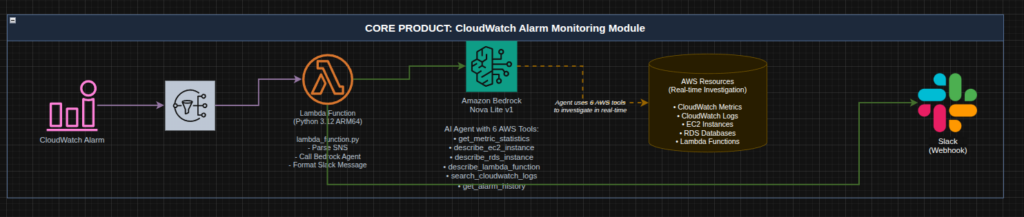
    I covered this in the past when I built an agent that can review your AWS bill and find practical ways to save money within your account. This application wasn’t event driven but rather a container that you could spin up when you needed a review or something you could leave running in your environment. If we take a same read-only approach to building an AWS Agent we can have have a new event driven teammate that helps us with our initial troubleshooting.

    The process flow is straight forward:

    1. Given a Cloudwatch Alarm
    2. Send a notification to SNS
    3. Subscribe a Lambda function to the topic (this is our teammate)
    4. The function utilizes the AWS Nova Lite model to investigate the contents of the alarm and utilizes its read only capabilities to find potential solutions
    5. The agent sends its findings to you on your preferred platform

    For my environment I primarily utilize Slack for alerting and messaging so I built that integration. Here is an architecture diagram:

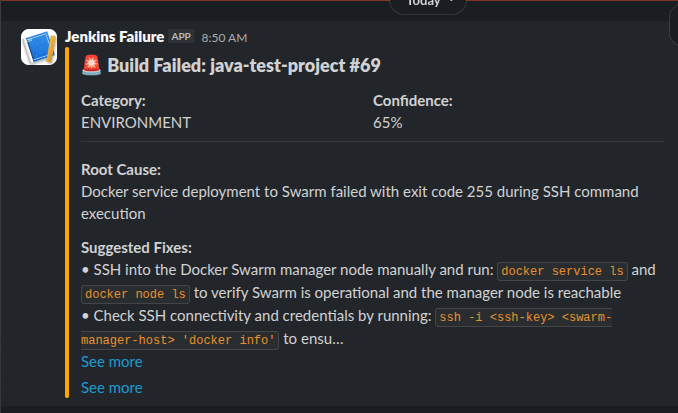
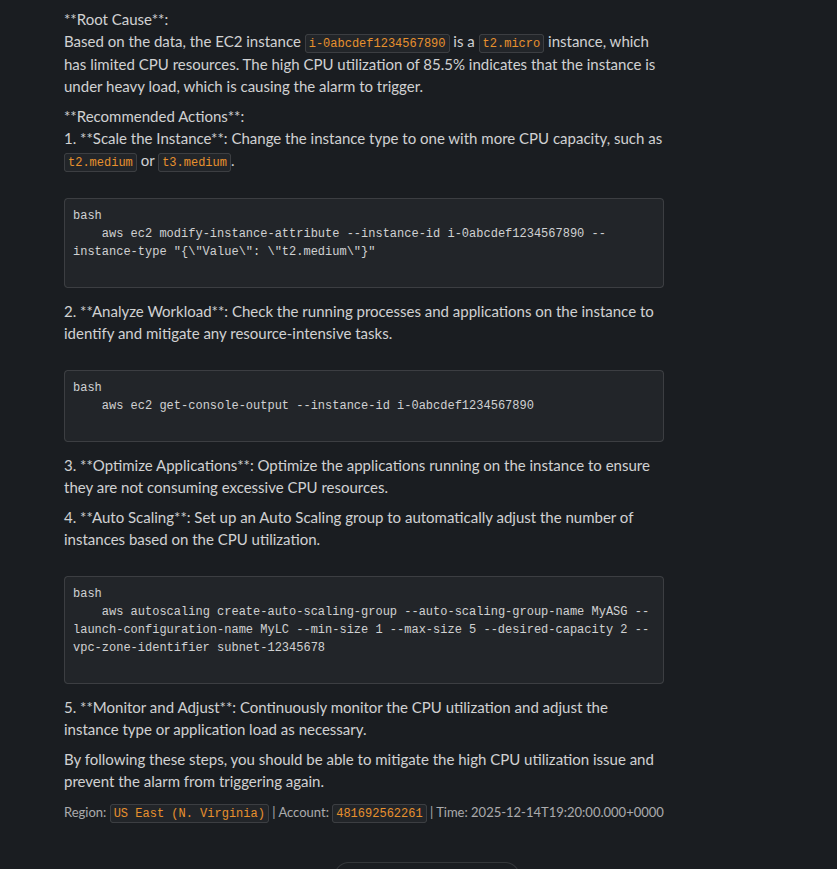
    When the alarm triggers we should see a message in Slack like:

    The AI is capable of providing you actionable steps to either find the root cause of the problem or in some cases, present you with steps to solve the problem.

    This workflow significantly reduces your troubleshooting time and by reducing the troubleshooting time it reduces your downtime.

    So, if this is something you are interested in deploying I have created a Terraform module so you can quickly deploy it into your own environment to reduce your troubleshooting steps!

    Check it out here: https://aiopscrew.com

    If you have questions feel free to reach out to me at anytime!

  • Fantasy Football and AI – Playoffs Round 2

    Well. It had to end at some point.

    I think the AI mostly selected correctly this week. Unfortunately it wasn’t enough. We fell short by about 5 points. Going into Monday night we needed a massive game from George Kittle as the rest of the team performed very poorly. He delivered all the way until the 4th quarter where he likely twisted his ankle and was done for the game as the 49ers were up 2 scores.

    Here are the results:

    Josh Allen might have had a foot injury early in the game but stayed in for the entire game. The Bills simply didn’t throw the football. TreVeyon Henderson got absolutely demolished and left the game with a probable concussion. Josh Jacobs was questionable going into the game and cleared to play. The Packers simply didn’t play him.

    With that loss we are eliminated from the playoffs and will be playing next week for 3rd place. Still a decent finish for our first year utilizing AI.

    Looking Ahead

    Through the off season I want to continue to work on the overall architecture of this agent and system. Ideally, I want to have the custom model built for next season and build an API around that to help us make better predictions.

    Other action items:

    1. Find a way to load news stories and story lines for determinations
    2. Manage injuries/waivers better
    3. Handle live NFL standings (teams eliminated from playoffs might play differently than teams fighting for a spot)

    I also would love to be able to expose all of this publicly so that anyone reading can build their own applications around my predictions.

    Stay tuned next week for our final placement!

  • Fantasy Football and AI – Playoffs Round 1

    So I was wrong in last weeks post! Our playoffs started this week. In my league all the teams go to the playoffs and if you lose then there is a loser’s bracket.

    Our AI run team was seeded at number 3. We were in a three way tie for first place and we ended the “regular season” with 2054.76 points. The leader had 2114.12. So, we weren’t far off the front!

    Anyway, enough of that. You all just want to know the outcome. Here is our point totals from our first round in the playoffs:

    I ran the AI on Saturday and it suggested pulling out Josh Jacobs in favor of TreVeyon Henderson. This ended up getting us an extra 10 points. Josh Jacobs still put up 24.2 points this week. Everyone played really well this week except Sam Darnold. I’m not sure if his hot streak is over or what is going on with him but its been rough. Christian Watson took a nasty hit in his game and left early but he is expected to be just fine.

    So, did we win? We sure did! We’re on to the next round of the playoffs and we’re going to be up against Jahmyr Gibbs so we have to hope for our best performance of the season next week. Here is the currently proposed roster:

    We have a lot of injuries and questionable players so I expect this to change. We picked up the Bills defense as they play Cleveland and they should have a good time against that struggling offense.

    As we look to the off season I hope to build up my API website https://gridirondata.com and start training the model that we will use for next year. I have been working on the overall workflow and looking into how I can have both the scrapers running in the cloud and in my homelab so that I can easily work with the data locally and not incur a lot of cloud cost.

    Stay tuned for more Fantasy Football news next week!

  • Fantasy Football and AI – Week 14

    Happy Wednesday. Victory Wednesday that is! Our AI selected correctly this week and we snuck in a tough win that was finalized on Sunday night.

    Unfortunately, we lost Zach Ertz on the way. A really nasty low hit took him out for the year. Here is the final scores for our lineup:

    Josh Allen came up huge for us. Breece Hall was useless and the Commanders defense might as well have never stepped out on the field. But, a win is a win! We are now in a 3 way tie for first place but will likely take the third seed into the playoffs given our total fantasy points.

    Here is the lineup for week 15: We’ve had to make some changes from waivers and I’m hoping the AI selected correctly. We are heading into the part of the season where teams are going to be fighting for playoff spots. I hope that it is taking that into account as it made the waiver picks.

    We have some highly projected players this week. What do you think? Will we be able to pull off another win this week?

  • Fantasy Football and AI – Week 13

    Sigh… another week another loss. It was a close one. It turns out people just didn’t really show up to play.

    Its hard to win a game when your high scorer is a defense. There was some light at the end of the Patriots game when Henderson was running down the field. Unfortunately they took him out and then the drive stalled. Had he been able to get a touch down we could have won. We left some points on the bench as well:

    Zach Ertz had a monster game and many of the other players would have been better than Saquon.

    On to week 14. This is the last week before our playoff run. Here is the current proposed roster:

    Its hard to not start Saquon Barkley. But he’s trending down and I think I agree with the AI here in not selecting him. Marvin Harrison Jr. is questionable again due to his surgery but is expected to play. We grabbed Christian Watson, Marcus Mariota and the Commanders defense for week 14. We dropped J.J. McCarthy due to poor performance and injury. Henderson is on bye this week. Our current bench looks like this:

    What do you think? Do you agree with the AI’s selections for the week?

  • Fantasy Football and AI – Week 12

    Well, unfortunately we took a big loss and are now in a three way tie for first place. Here are the actual results:

    I think the biggest hit was how poorly Josh Allen played. What is interesting is that I was reviewing his passed performance against Houston and he has had his worst outings of his career there. This week was no different… The other interesting thing is that Saquon Barkley just isn’t the same back as he was last year. He is trending down.

    In response to Josh Allen’s poor outing I added a deviation and historical performance analysis against and opponent to the data set so now we have a value like:

    "HOU": {
       "avg_actual": 11.6,
       "avg_deviation": -2.67,
       "avg_deviation_percentage": -18.69,
       "avg_projected": 14.27,
       "by_season": {
        "2024": {
         "avg_actual": 14.6,
         "avg_deviation": 0,
         "avg_deviation_percentage": 0,
         "avg_projected": 0,
         "games_played": 1,
         "games_with_projections": 0
        },
        "2025": {
         "avg_actual": 5.05,
         "avg_deviation": -5.65,
         "avg_deviation_percentage": -52.8,
         "avg_projected": 10.7,
         "games_played": 2,
         "total_actual": 10.1,
         "total_projected": 21.4
        }
       },

    I then coded a new tool inside of the AI to reference this data set to assist with its final calculations.

    So, when we ask the tool about Josh Allen’s performance against a team we get something like:

    Found exactly what you're looking for in Josh Allen's performance data.
    
    Josh Allen vs Kansas City (Week 9, 2025):
    - 28.8 fantasy points - That's a STRONG performance!
    - He was projected for 22.0 points but exceeded by 6.8 points (+30.9%)
    - This was one of his better games this season
    
    Historical Context (2024 vs KC):
    - Week 11, 2024: 24.0 fantasy points vs Kansas City
    
    Bottom Line: Josh Allen has performed WELL against Kansas City in recent matchups. In their two most recent meetings:
    - 2025 (Week 9): 28.8 points
    - 2024 (Week 11): 24.0 points
    
    That's an average of 26.4 fantasy points against KC - well above his season average. Allen seems to rise to the occasion against elite competition like Kansas City. The Chiefs' defense can be vulnerable to mobile QBs who can extend plays, and Allen's dual-threat ability has historically given them problems.
    
    The takeaway: When Allen faces KC, he typically delivers QB1 numbers. That 28.8-point performance this season shows he can still light up even the defending champs!

    I need to backload some more historical data yet but that is a problem for a different day. Looking forward, I hope to build my own model based on this data and setup an automated workflow that will include data ingestion and automated model building so that I can consistently build predictions.

    So, on to week 13. We have a bunch of injuries this week to contend with so this lineup will likely be changing once people are reporting. Here is the current lineup:

    In other news I built and launched https://gridirondata.com which is an API to reference all of the data I have collected so far.

    Unfortunately, its not free. But if you message me about it I’ll probably hook you up!

  • Building jsontotoon.io: A Free Tool to Cut Your LLM API Costs

    If you’re working with LLM APIs, you’re probably watching your token counts like a hawk. Every JSON object you send to Claude, GPT-4, or Gemini costs tokens, and those curly braces and quotes add up fast. I built https://jsontotoon.io to solve this exact problem—and it’s completely free to use.

    The Problem: JSON is Token-Inefficient

    Here’s the thing: JSON is fantastic for machine-to-machine communication. It’s ubiquitous, well-supported, and everyone knows how to work with it. But when you’re paying per token to send data to an LLM? It’s wasteful.

    Look at a simple example:

    [
      {"name": "Alice", "age": 30, "city": "NYC"},
      {"name": "Bob", "age": 25, "city": "LA"},
      {"name": "Carol", "age": 35, "city": "Chicago"}
    ]

    That’s 125 tokens. All those quotes, braces, and commas? The LLM doesn’t need them to understand the structure. You’re literally paying to send redundant syntax.

    Enter TOON Format

    TOON (Token-Oriented Object Notation) converts that same data to:

    name, age, city
    Alice, 30, NYC
    Bob, 25, LA
    Carol, 35, Chicago

    68 tokens. That’s a 46% reduction. The same information, fully reversible back to JSON, but nearly half the cost.

    I realize this sounds too good to be true, but the math checks out. I tested it across real-world datasets—API responses, database dumps, RAG context—and consistently saw 35-45% token reduction. Your mileage will vary depending on data structure, but the savings are real.

    How I Built It

    The backend is straightforward Python running on AWS Lambda. The TOON parser itself is deterministic—same JSON always produces the same TOON output, and round-trip conversion is lossless. No data gets mangled, no weird edge cases (well, I fixed those during testing).

    Infrastructure-wise:

    CloudFront + S3 for the static frontend

    API Gateway + Lambda for the conversion endpoint

    DynamoDB for API key storage (with email verification via SES)

    WAF with rate limiting to prevent abuse (10 requests per 5 minutes on API endpoints)

    CloudWatch dashboards for monitoring

    The whole setup costs me about $8-15/month in AWS fees, mostly for WAF. The conversion itself is so fast (< 100ms average) and cheap that I can offer unlimited free API keys without worrying about runaway costs.

    Real Use Cases

    I built this because I was spending way too much on Claude API calls for my fantasy football AI agent project. Every week I send player stats, injury reports, and matchup data in prompts. Converting to TOON saved me about 38% on tokens—which adds up when you’re making hundreds of calls per week.

    But the use cases go beyond my specific problem:

    RAG systems: Fit more context documents in your prompts without hitting limits

    Data analysis agents: Send larger datasets for analysis at lower cost

    Few-shot learning: Include more examples without token bloat

    Structured outputs: LLMs can generate TOON that’s easier to parse than JSON

    Try It Yourself

    The web interface at https://jsontotoon.io is free to use—no signup required. Just paste your JSON, get TOON. If you want to integrate it into your application, grab a free API key (also no cost, no expiration).

    Full API docs are available at https://jsontotoon.io/docs.html, with code examples in Python, JavaScript, Go, and cURL.

  • AI and Fantasy Football – Week 11

    Wow. Week 11 was filled with injuries. Josh Jacobs went down early with a knee injury. Aaron Rogers went out with a wrist injury but it all started off with an epic performance by TreVeyon Henderson putting up 32.3 points. The end result of week 11? ANOTHER VICTORY FOR AI! The team is now in 1st place. With all those injuries you might be wondering how we pulled off another victory. Well, here is the final scores for the week:

    Josh Allen came through massively with a 51 point game. Riley Patterson put up a few good kicks over in Madrid and George Kittle had a great game as well.

    Looking forward to week 12, we will have to battle some injuries but I think the depth chart should be able to sustain the blows. Here is the current proposed lineup:

    So, tech and data stuff. I added deviations into the data set. So now we can see the difference between what a player’s projection was and their actual. This will help the AI determine how a player is preforming. This is being structured on a per season per week basis as well as historically against an opponent. Next year this data will be valuable when looking at future matchups and draft choices.

    Next, I’m also working on launching an API for this entire project so that you can access the data and utilize it for your own applications. I hope to have a working beta of this by the end of the week! If you are interested in utilizing it feel free to message me. I’m sure a few of you can receive some free keys once its ready! I’ll have a separate post about the API once its ready.